




I wager that many of us gaze all day long at our monitors, working on images. A side bet — and one no doubt that I’d win — would be that for all the time spent tweaking the image’s colors, few of us spend even a moment to improve the colors available from that display.
Left to its own devices, a CRT display can develop color impurities, or small artifacts that can affect the colors in parts of the screen. Fortunately, the fix doesn’t have to come at great expense, such as from the color calibration package I described in a recent column. Actually, it doesn’t require any expense at all.
Instead, the means could already be waiting for you inside your CRT display in its controls for degaussing and color purity. These settings can remove temporary color changes on the screen as well as correct the alignment of the tube’s electron guns.
Sorry to say, both testing for purity and adjusting the controls can take a bit of doing. And the subject is hardly covered in your monitor’s documentation. Before I delve into the test procedure, let’s look at what’s happening inside the tube to cause the problem, as well as some related (okay, somewhat related) color issues.
Electromagnetic Personality
In case you were absent on that day in school, here’s a refresher on the basics of a CRT: three electron guns (one each for red, green, and blue colors) direct their beams on tiny clumps of RGB phosphors that coat the inside of the screen. When excited by the electron spray, the phosphors glow. In addition, there are electromagnetic components that control and aim the beams, as well as varying technologies that focus the beams before they reach the colored phosphors. Yes, it is a miracle of somewhat-modern science.
If everything is aimed correctly, each beam will strike only the dots of its corresponding color, so that the red beam touches only the red phosphors. When this occurs, the colors are pure.
However, when the things are out of alignment, some spillover can occur. The beam will hit the phosphors of not only the correct color but some of the neighboring phosphors of a different color as well. In some areas, often in the corners, there can be a sprinkling of a different color. For example, red will become a shade of pink or yellow depending on the other colors that are excited.
For the most part, purity defects aren’t due to some manufacturing error. Instead, they occur naturally as the monitor ages: from very slight warping of the focusing mechanism; or from something physical, like a bump; or even exposure to an outside electromagnetic source.
It doesn’t take much to cause some magnetic effect. According to Sam Goldwasser’s Notes On The Troubleshooting And Repair Of Television Sets, screens can become magnetized “if the TV or monitor is moved or even just rotated; if there has been a lightning strike nearby (a friend of mine had a lightning strike near his house which produced all of the effects of the EMP from a nuclear bomb); if a permanent magnet was brought near the screen (e.g., kid’s magnet or megawatt stereo speakers); or if some piece of electrical or electronic equipment with unshielded magnetic fields is in the vicinity of the TV or monitor.”
In addition, purity artifacts can be seen on relatively new monitors. Last fall, I examined almost two dozen monitors for a review panel, and while all of the CRTs were less than a year old, most showed some degree of color impurity!
A Pixel of a Different Color
Tackling color purity is a two-step process: First there’s testing and then fixing. That seems obvious. However, there’s no testing software available for the task — it all must be done with home-grown tools and our eyeballs. Next, the fixing will require the manipulation of the monitor’s built-in purity controls.
It’s next to impossible to detect color purity when viewing an ordinary image such as a digital photograph. There’s just too much going on the screen. How would you know if this or that pixel is off color?
To find the impurities, or the correct alignment of the electron guns, we need to fill the screen with a single color, specifically with each of the pure RGB colors. This task is no problem with an image editing application such as Adobe Photoshop.
Open a new document im Photoshop and with the color tool, set one of the RGB colors to 255 and the others to zero (see below). Save the file and repeat this process for the other two colors. Then, fill the screen entirely with one of the test images (in Photoshop on the Mac, you do this by keying in command-F a couple of times).
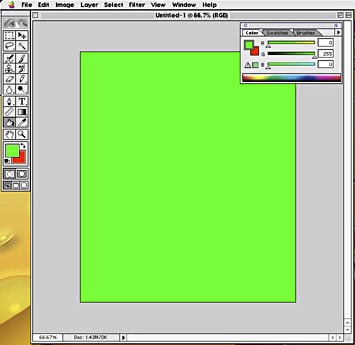
It’s easy being green. Here’s an example of the all-one-color document needed to test color purity. The problem is easy to see when the screen is filled with a pure color that’s all red, green or blue. For a full-size version of this image, click here (57K).
Now, look closely at the screen, preferably in a completely darkened room, which will avoid reflections on the glass. This is also a good time to wear that ninja outfit you wore for Halloween a few years ago. Do you see any areas with different colors? Or some sprinkles of other colors?
If the answer is no, then proceed to test the display with the remaining single-color documents. If you see spots, then you should try to fix them (keep reading to find out how).
Joel Ingulsrud, a product manager at monitor vendor Totoku North America, warned that monitors should be “well-warmed up before attempting adjust color purity,” meaning at least an hour or two before testing. He said this warm-up period is particularly important for CRTs that use a shadow mask to focus the beams. The mask is a single sheet of thin metal with lots of tiny holes and it can warm up unevenly, causing temporary purity problems. If you “fix” the temporary condition on a cold monitor, then you could introduce new color problems after it warms up.
Under the Gun
Correcting color impurities is somewhat easy — if your monitor has the right stuff for the job. Many 21-inch CRTs sold into the design market provide special controls for color purity, however, not all do; and only a few 19-inch displays have the necessary settings.
The first thing to do it to degauss the display several times. The degauss function is found in the monitor’s so-called On-Screen Display (OSD), which can be accessed through the buttons on the front or side of the monitor’s enclosure. This routine can eliminate a number of screen artifacts caused when parts of the screen become magnetized.
The degauss routine sends a blast of current through a special coil electromagnet inside the monitor that can override some transiently magnetized sections. However, it’s not good for the monitor to degauss more than a few times in a row. Wait a several hours before trying another pass.
When degaussing fails to clear up the condition, you must look to the monitor’s color purity control (also located in the OSD). Different vendors have different names for the control: For example, Eizo uses “Purity,” while Iiyama calls it “Raster Rotation;” Sony dubs it “Landing.” Most only adjust the colors in the four corners, although some manufacturers let you also adjust the overall image.
With the color image open on the screen, open the OSD window and click to the purity control (if the OSD window is hiding the impurity artifacts, you may want to move the window to another part of the screen). Then use your monitor’s tool to adjust the purity. You will see its action in real time.
Owners of monitors without a specific purity control must be satisfied with degaussing. Goldwasser’s article also provides arcane instructions on how to use a handheld coil (often sold for erasing tapes) to remove recalcitrant impurities. After reading the directions, I think it would be wise to practice first on the monitors of friends and relatives.
Following my past columns on color quality, some of you have maintained that a monitor is just a monitor, and that they’re all alike. Or you’ve held that the extra features aren’t worth the cost.
Such a saving may be true for everyday business or consumer computing (or not — but that’s a matter for another discussion). Clearly though, when it comes to color purity, there’s a substantial difference, especially for the professional content creator who makes his or her living on color quality.
I find some understanding of this situation from a saying by the Chofetz Chaim: “The thriftiest with money are the most spendthrift with desires.” Your wishes may be plentiful but they will provide scant comfort when you try to correct color purity without any built-in controls.
This article was last modified on January 3, 2023
This article was first published on May 9, 2002
Commenting is easier and faster when you're logged in!

Recommended for you

Free 3D Photoshop Objects from Pixelsquid
Online image libraries come and go, and the good ones get swallowed up by Getty....

How to Create Realistic Watercolor Effects in Photoshop
Learn how to use Photoshop to create hand-brushed watercolor effects that don’t...

Fly the Creative Skies
Excerpted from “Window Seat, The Art of Digital Photography and Creative T...