




This InDesign tip was sent to Tip of the Week email subscribers on January 31, 2019.

Sign up now and every week you’ll get a new tip, keyboard shortcut, and roundups of new articles, plus exclusive deals sent right to your Inbox!
Just scroll down to the bottom of this page, enter your email address, and click Go! We’ll take care of the rest. Now, on with the tip!
Layers are an essential tool for organizing the content in your InDesign documents. Here are 5 tips to help you work efficiently with layers:
1. Always name your layers to identify the content that belongs in them. In the Layers panel, click on the layer you want to name, pause for a moment, then start typing. Even better, name each new layer as you create it by holding Option/Alt while you click on the the New layer icon in the Layers panel.
2. By default, new layers are created above the currently selected layer. If you want to create a new layer below the current layer, hold Command/Ctrl while you click on the the New layer icon in the Layers panel. To create a new layer on top of all others, hold Command+Shift/Ctrl+Shift while you click the icon. And remember to add Option/Alt if you want to name these new layers.
3. To select all items on a Layer, Option/Alt+Click on the layer name in the Layers panel.
4. To copy a layer from one document to another, make sure Paste Remembers Layers is selected in the Layers panel menu, then copy an object from the desired layer and paste it into the other document.
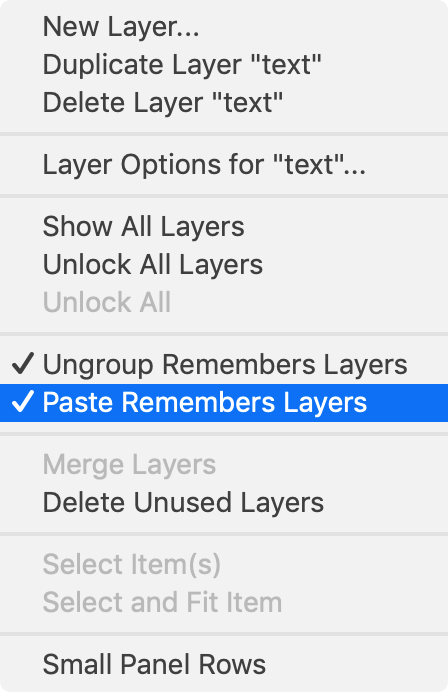
5. You can use the Layers panel to change the stacking order of objects, by dragging them up or down in the panel. You can also add or remove items from groups, just by dragging those items in the Layers panel into (or out of) a group.
This article was last modified on July 7, 2021
This article was first published on February 5, 2019
Commenting is easier and faster when you're logged in!

Recommended for you
Keep Footer Info Always Visible in InDesign
Keep your full-page photographs from blocking headers and footers in InDesign wi...

Automatically Select Layers in Photoshop
Use this trick to select a layer’s content by clicking directly on the canvas, i...
Livestream Video: Hidden Font Features You Didn’t Know Existed
Join Khara Plicanic to learn some great tips and tricks for working with layers...