


Tip of the Week: Using Discretionary Line Breaks
How to use discretionary line breaks to avoid bad breaks when using en spaces and em spaces in InDesign.


This InDesign tip on using discretionary line breaks was sent to Tip of the Week email subscribers on January 11, 2018.

Sign up now and every week you’ll get a new tip, keyboard shortcut, and roundups of new articles, plus exclusive deals sent right to your Inbox!
Just scroll down to the bottom of this page, enter your email address, and click Go! We’ll take care of the rest. Now, on with the tip!
InDesign treats special white space characters (such as em and en spaces) as nonbreaking. This can cause awkward breaks in some situations.

If you want to allow them to break at the end of the line, insert a Discretionary Line Break (from the Insert Break Character submenu, under the Type menu).

Not only will the awkward break be fixed…
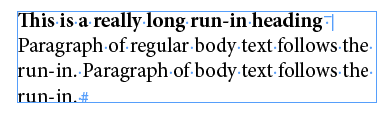
…you’ll also be covered if the text is edited and you need the en space or em space to do its job.

This article was last modified on July 20, 2021
This article was first published on January 16, 2018
Commenting is easier and faster when you're logged in!

Recommended for you
Tip of the Week: Using Align and Distribute with Guides
This InDesign tip on using align and distribute with guides was sent to Tip of t...
The Mystery of the Missing Frames Contest Answer and Winner!
It’s time to reveal the solution (and prize winners) for this month’...
Avoiding the Insane Behavior of Undocked Panels
Pet peeves. We all have ’em. And if you spend enough time using any software pro...