



Will asked:
Is it possible to ‘Add/insert’ at the end of a sentence in a table?
The best and quickest way to add text at the beginning or end of many table cells is to:
- Select the table cells you want to affect. You can select an entire row or column, or, to select the entire table, just click inside the table with the Type tool and then press Command-Option-A or Ctrl-Alt-A.
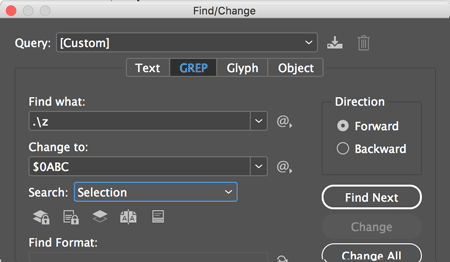
- Open Edit > Find/Change and switch to the GREP tab (don’t worry, it’s easy!)
- Set the Search pop-up menu (the scope) to Selection
- Search for
./zand change to$0ABC(where “0” is a zero and “ABC” is whatever text you want to insert at the end of the table cell. - Click Change All
That will only place the text (“ABC” in the example) in table cells that are not empty. (I haven’t found a way to place text inside empty cells; if you know of one, type it below in the comments.)
This article was last modified on November 11, 2021
This article was first published on December 7, 2017
Commenting is easier and faster when you're logged in!

Recommended for you

Typesetting Math in InDesign
Maryanne wrote: The geologists here produce their drafts in Word, and then I imp...
Turning Off Hyphenation for URLs
Need to break long URLs across a lines, but don't want hyphens? The answer may b...

How to Fill in Empty Table Cells
Empty table cells can confuse readers. David Blatner offers several solutions, i...