



Diane wrote:
I have imported a Word doc into InDesign and had a glyph weirdness. When I chose Adobe Garamond Pro, all of my commas, periods and other punctuations turned into smaller and higher placed versions of themselves. But when I choose Garamond Premier Pro it doesn’t happen.
Floating punctuation is a classic problem having to do with the Fractions OpenType feature: When the Fractions feature is enabled, some OpenType fonts exhibit this behavior, and some don’t.
So check your paragraph style, your character style, or any local formatting that might be applied to the font. As we’ve said before we do not recommend leaving the Fraction feature on for all your text — just apply it to the text that really is a fraction. You can turn this on/off from the OpenType submenu, in the Character panel menu, or the Control panel menu:
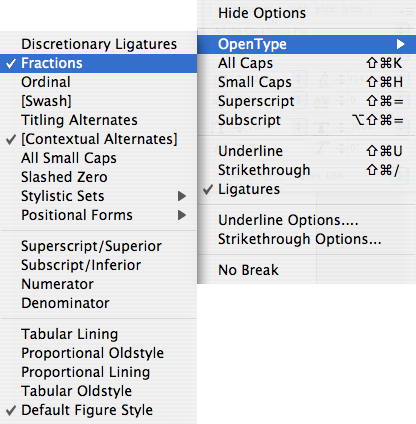
Also, check our Guide to OpenType Fractions for more information.
This article was last modified on December 18, 2021
This article was first published on September 19, 2007
Commenting is easier and faster when you're logged in!

Recommended for you

Batch Change Hyperlinks Across a Whole InDesign Document
What if you had to edit 900 hyperlinks in 5 minutes? Or make other huge changes...
Search for Foreign Language Characters in Text
InDesign offers very fine grained control over find/change, including which sort...
Transform a Frame Into a Grid of Frames
Splitting a frame into a grid of smaller frames isn't that hard... once you know...