Forum Replies Created
-
AuthorPosts
-
Kelly Vaughn
ParticipantWant to send me your document to take a look at? kelly – a t – document geek dot com
ParticipantI would start by making dedicated paragraph style for your TOC. Then in the nested styles section of the TOC paragraph styles dialogue box, set up a nested style for an invisible character style up through one space. To create the invisible character style, use no stokre, no fill and set the point size to something really small, like 0.1 point.
That will make the digits disappear.
If you need the digits permanently gone, so they won’t show up in the bookmakers when you export to PDF, use a GREP search to remove all the digits at the beginning of the paragraphs. You’ll have to run that GREP search each time you regenerate the TOC. A GREP person likely lurking here in the forums will be able to provide you the proper GREP to do what you need.
But if PDF bookmarks are of no concern, use the nested styles trick mentioned first.
ParticipantHi Tyler, I took a look at your file and Peter’s solution works really well. You did a great job with the formatting, as well. Nice work on a fairly complex TOC.
ParticipantSend me a DM on twitter and I’ll give you me email address. https://twitter.com/documentgeek
ParticipantHi Tyler,
I wrote about this topic a few years ago. https://creativepro.com/how-to-incorporate-chapter-thumbnail-images-into-an-auto-generating-table-of-contents.php.
I would be happy to take a look at your file for you and see if I can troubleshoot it.
ParticipantHi Charlotte,
I can help. Cross references are the way to go. I sent you a message through LinkedIn. You can find some of my work at: https://documentgeek.blogspot.com
Feel free to contact me offline.
–Kelly Vaughn
ParticipantHi Hugh,
In my experience it’s been critical to learn not just InDesign, but the other major Adobe programs as well (Illustrator, Photoshop and Acrobat). Because I learned those four programs, when the opportunity of a lifetime presented itself to me, I was ready. I wrote an article awhile back about my experiences. https://documentgeek.blogspot.com/2013/02/why-you-should-consider-becoming-adobe.html
That article speaks at length to the Adobe Certified Expert program. Personally, I think the ACE program quickly becoming irrelevant (due to poorly written and very expensive tests). But regardless, the preparation required for such tests proved invaluable. You see, I am self employed. But prior to that, when I was working for an employer, I lost my job 5 times because the companies kept going out of business! I never had a job more than 2 years (The typical tenure was much shorter). since becoming self employed with my own specialty publishing company, I have had the same stable job for nearly eight years!
Keep studying and learning!
ParticipantNearly seven years later they fixed it! https://helpx.adobe.com/indesign/kb/crash-hyperlinks-panel-quick-apply.html
ParticipantHi Nathan,
Can you send me your file? kelly-at-documentgeek . com
December 12, 2016 at 10:43 am in reply to: Adding a special character in front of numbered list #90475Participant1. First make a numbered list
2. Then make a bulleted list (checkbox) paragraph style).
3. Then make a TOC that includes the numbered list paragraph style, have the Entry style be your checkbox paragraph style, and choose “Include Full Paragraph.”https://creativepro.com/wp-content/uploads/2016/12/TOCSetup-.png
ParticipantAnyone skilled at editing a PDF will be able to extract the images. You cannot lock them selectively in a PDF. You can, however, apply very tight security on the final PDF. You’ll need to do that in Acrobat.
ParticipantSorry, your screenshots aren’t showing up. Can you tell me where in the process it’s not working?
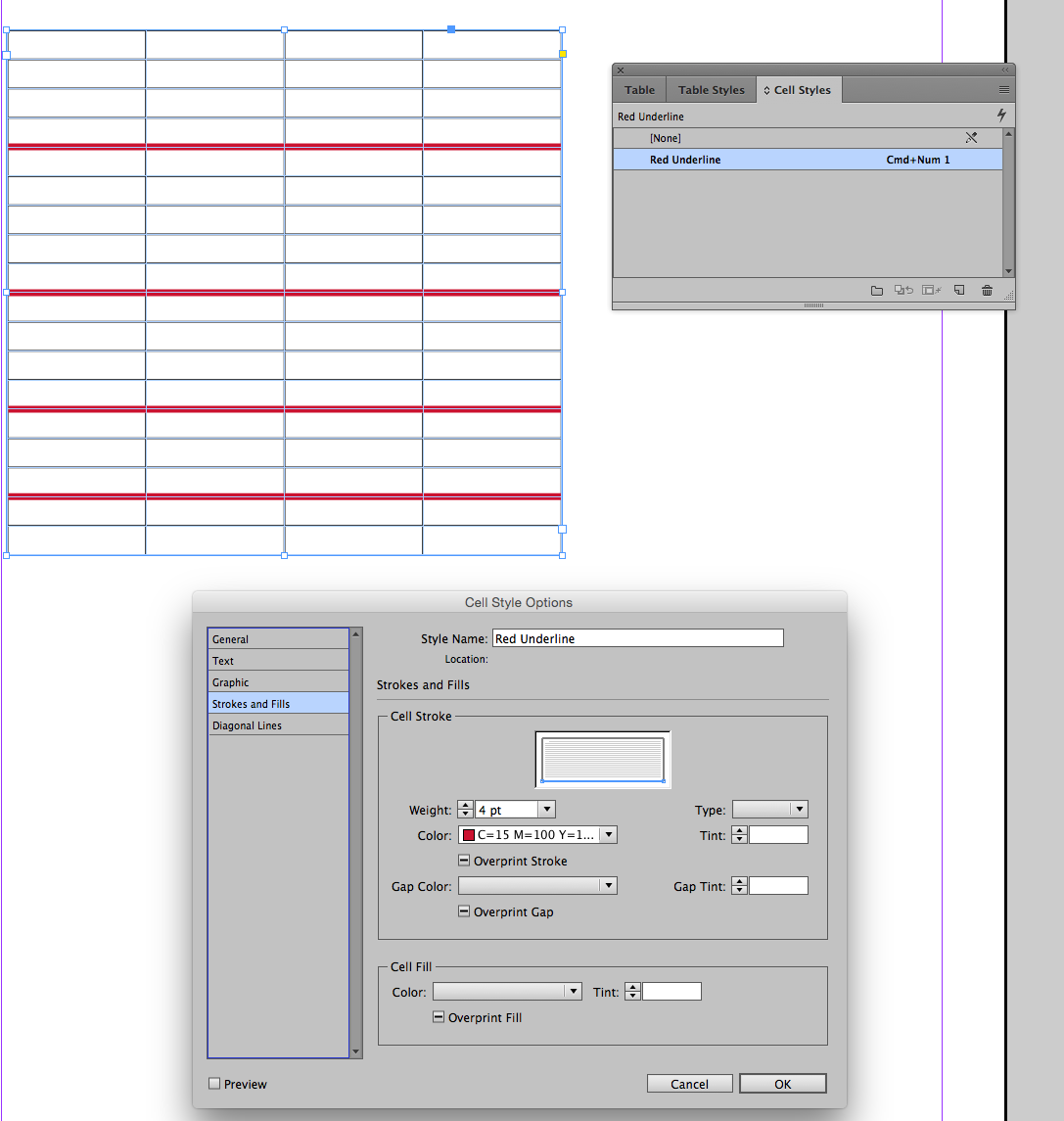
ParticipantYou can create either one first. But you need after you’ve created your cell style, you need to select the cells you want to apply the style to, and then apply the cell style. The order of creation should not matter.
Can you post a screen shot?
-
AuthorPosts