Forum Replies Created
-
AuthorPosts
-
Andy Mcgroarty
MemberThere are over 30 master pages, for 30 chapters. I’ll try the script on the master pages, if it doesn’t work i’ll just have to get in the zone ;-)!
Thanks again David. Huge help as always!
MemberThank you David! I found them and applied them and i worked perfectly! But it didn’t move the page numbers at the bottom and the chapter titles at the top of the page, presumably because these are part of the master pages. Is there any magic script for those guys?
Thanks again
MemberOk, so i have just realised that i bought CS6 as a download and don’t have install discs, where would i find this script?
MemberBrilliant David! Thank you so much! I love this place! You guys are awesome!
MemberOk, i see, interesting. Cool, thanks for sharing Dwayne
MemberBrilliant! Just out of interest what does the old-time editor or proof reader expect to see?
MemberThank you Dwayne. That is really interesting reading about your method, it is almost like a half way house between both approaches outlined in the article. I went for the ‘not to square’ approach in my first books. But i might try giving your method a go, seems sensible.
I don’t mind the rambling at all! it is really useful to hear about all the nuances involved, every little really helps.
Best wishes
Andy
MemberThank you Anne-Marie and Dwayne for your invaluable advice as usual.
It didn’t know this was such a problem for some folks, this thread is particularly interesting: https://forums.adobe.com/message/1289135
Thankfully i don’t seem to be in the bad habits that you have mentioned, phew!
But having looked into this a little issue more i’m not sure i’m using the right terminology, i think widows and orphans is close but what i’m talking about is not so much the odd word, but a whole line of text of a new paragraph at the bottom of the page, or a whole line of text at the end of a paragraph on it’s own at the top of a page.
I was under the impression that you shouldn’t leave them on their own and either use a line break to put the line of text on the bottom of the page onto the next page, or use the line break to put the previous line at the bottom of the page on to the top of the next page.
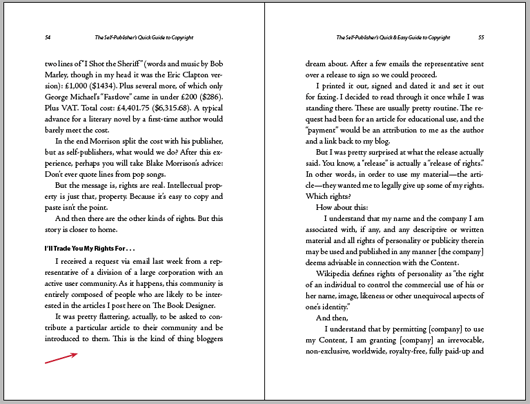
But this means that on quite a few pages the bottom of the page is uneven, either one line short on one side or the other, like in this image: https://www.thebookdesigner.com/wp-content/uploads/2010/10/spread2.png And I gather from this article: https://www.thebookdesigner.com/2010/10/pagination-styles-shall-we-kill-the-widows-orphans/ that this is a contentious issue. Like i said i am experimenting to try and lessen this from happening, but i wondered if i could draw on your expertise and experience to see what your opinion is about this.
Thanks again and best wishes
Andy
MemberHi Dwayne
In a world where so many people are overly sensitive, easily offended or on the opposite end don’t really care about the effect that they have on others by their words and actions your attitude is refreshing, sobering and reassuring.
It shows that not only do you care about your work and but that you care about others, by sharing your experience and insight in the hope that it will be beneficial to others shows a great quality. And i personally think that it is really beneficial, to have that time served experience at hand in this forum for us younger and newer to this pursuit is really invaluable. I value your opinion, so know that it is well and truly appreciated.
To the matter discussed, you are so right, crooked books! I have now produced 4 books to date and none of them have been produced as i laid them out, neither the covers or the insides, i had to send a 1000 copies back to the printers because the margins were printed squint. It was only by a few mm, but to me it was quite noticeable. Despite this degree of error being covered in their small print (another problem) i managed to persuade them to do the print run again. I was really quite shocked after all the time and care that i put into them how poor the printing was, and this was with one of the best printers in the UK! It is just a typical example of how crass our interactions and transactions have become. Mediocrity has sadly become an acceptable norm.
Anyway, it feels like i’m waffling on a bit now, oh, thank you for the ascender and descender tip, that was the kind of rule of thumb i was looking for. Thanks once again, your help is always appreciated.
Best wishes
Andy
MemberThank you Dwayne! You are right and i needed to hear that! It’s been driving me up the wall!
I was just really looking for a method that would work irrespective of the typeface and spine size to make work easier, and to go with the mathematical seemed to make the most sense.
Thanks again for your help
Best wishes
Memberok, thank you! but am i barking up the right tree?
MemberWould it not be fair to say that the exact middle of the document is the exact middle of the spine, therefore should we not align the exact mid point of the type face to that mid point?
The question is then, how do we assess the exact mid point of the typeface? the middle of the capital H or the I?
Any help would be most appreciated, thank you!
MemberI’m using Adobe Garamond Pro
MemberI mean vertical David. So could you advise a good practice/rule of thumb?
MemberThanks again Dwayne, that is all really useful. It’s a shane that there isn’t more info on what goes into a font. I have several bought professional font’s and i’m quite surprised at how poor they look and kern. Oh, well the quest continues!
Best wishes
-
AuthorPosts