


Nikon Coolpix 2500: Handy 2-Megapixel Point-and-Shoot with Cool Design


Image Quality
While 2-megapixel cameras are at the low end of the spectrum now that 4-megapixel, and 6-megapixel cameras are becoming commonplace, they offer the advantage of compact image files and a relatively painless price. They are ideal for shooting images to use on the web, or in smaller sizes for print (the Coolpix 2500 shoots up to 1,600×1,200 pixels, which will print flawlessly at up to 4×5 inches in a 150 lpi screen (or 300 dpi), and it produces fine-looking 8×10 prints on most photo inkjet printers.
Perhaps more than any other digital camera vendor, Nikon respects the original image captured by the lens, and the camera performs a minimal amount of image processing prior to storing a photo in memory (see figure 6). This means the camera preserves as much dynamic range as possible for you to manipulate with image processing software, such as Adobe Photoshop, making it ideal for creative professionals. On the other hand, digital cameras from Olympus, for example, sacrifice quite a bit of image flexibility to give you a better looking image straight out of the camera. Which is better is a matter of preference, but I like Nikon’s approach, which gives me more room to work in Photoshop.

Figure 6: Nikon’s ability to capture the dynamic range of the original image means more room to maneuver in Photoshop.
Nikon View 5
The Coolpix 2500 ships with Nikon View 5, the same image cataloging software supplied with its high-end digital cameras. Nikon View 5 is the best of the image catalogers supplied with the current crop of digital cameras, but I did run into a bug that caused it to crash on any dual-processor Mac. The PC version worked without a hitch, and Nikon plans to release an update to fix the dual-processor Mac bug in the near future (see figure 7).
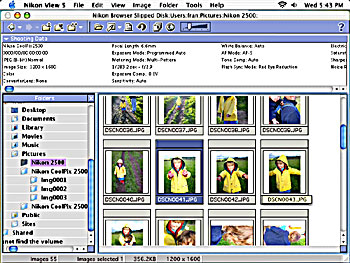
Figure 7: Nikon View software, which ships with the camera, is one of the better bundled image browsers.
The installer also includes the ArcView Photo Suite, a set of tools for manipulating photos and stitching panoramas, for example. The ArcView suite provides minimal functionality and the image editor and panorama maker provide only a tiny subset of the capabilities found in full-featured applications like Adobe Photoshop and RealViz Stitcher, respectively (see figure 8).
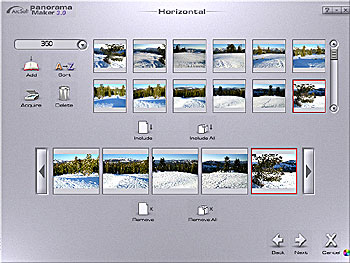
Figure 8: Nikon includes ArcView’s panorama software, but if you like making panoramic views, you’d do better to use a more full-featured program.
Details
The Coolpix 2500 ships with an 8MB Compact Flash memory card (you’ll probably want to upgrade), a rechargeable NiMH battery and charger, and cables for viewing images on a television and transferring pictures via USB to your computer. The English-language manual is straightforward and spares users the pile of random addendums and miscellaneous leaflets that have become the bane of camera buyers. A poster-size quick-start guide makes getting started a breeze.
Overall, the Coolpix is a fine point-and-shoot camera that lives up to Nikon’s reputation for innovation and quality. It deserves a home in the pocket of any creative professional.
This article was last modified on January 18, 2023
This article was first published on April 23, 2002
Commenting is easier and faster when you're logged in!

Recommended for you

Turn Your Mobile Phone into a Microscope With the Micro Phone Lens
Got a smartphone or tablet? Like macro photography? Then you might want to check...

DSLR Camera Prime Lenses Explained
Often new photographers and videographers feel that prime lenses should be the f...

The Creative Zone: Taking Your Photography to the Next Level
Excerpted from Canon EOS M: From Snapshots to Great Shots by Jeff Carlson. Copyr...