




Sometimes I just have too many text frames on a spread and I want to merge them together. Not a big deal if they’re already threaded together. But if they’re unthreaded frames, then getting all that text into a single frame can be a pain in the… well, pick your least favorite part of the body to have a pain of this sort.
If I recall, there was a cool feature of Aldus PageMaker (I’m sorry, but it’ll never really be Adobe PageMaker to me) that let you copy a bunch of text frames at the same time, then past them all into a single, merged story. Now, help comes to InDesign and Illustrator, in the forms of a couple of scripts written by Ajar Productions.
The Merge Text Frames for Adobe InDesign script works in InDesign CS2, CS3, and CS4. You can get it here. You can also find a version for Illustrator here.
Here’s an example (before, dialog box, and after):

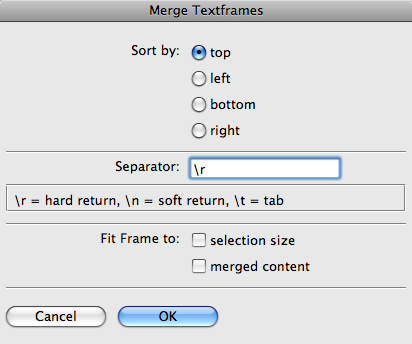

It’s cool. Really cool!
One example of where I know I’ll be using this is after converting files with the PDF2ID plug-in from recosoft. It’s a very helpful plug-in, but I often get lots of text frames where I just want one.
This article was last modified on December 19, 2021
This article was first published on November 27, 2008
Commenting is easier and faster when you're logged in!

Recommended for you

Free Webinar on Optimizing InDesign Files for Translation
News about a free webinar on how to optimize InDesign files for translation, tak...

Create Vector Graphics for Presentations with Vectorizer.ai
Turn raster graphics into vector files that scale beautifully in your presentati...

Linotype Releases New Fonts in January
A new year is here, time to get back to the drawing board. Linotype has been bus...