



InDesign trainer extraordinaire and all-around nice guy Mike Witherell (owner of JetSet Communications in the D.C. area) has put together a handy one-page cheat sheet of all of the text and GREP metacharacters you can use in a Find/Change operation and made it available to any InDesign user. Here’s a small excerpt:
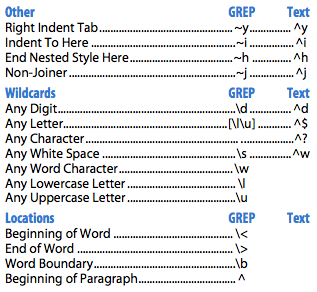
(The Text column is blank if no text metacharacter exists for an entry.)
While I think you can discover most of these just by revealing the submenus to the right of the Find and Change fields in InDesign CS3, they’re cumbersome to navigate through. Also, you can enter a lot of the text metacharacter ones in other places in InDesign, such as the “stop” character field when you’re creating a nested style, and those places don’t have the submenus. If you have Mike’s chart tacked up next to the computer, you can see at a glance what’s available.
Download the “GREP versus Text Metacharacters” PDF (50K). Find out more about Mike and the training firm he and his wife Urszula run by visiting their web site, JetSetCom.net.
This article was last modified on December 19, 2021
This article was first published on July 23, 2008
Commenting is easier and faster when you're logged in!

Recommended for you

Typefi Announces Typefi Publishing System Version 2.7
Typefi Systems Inc. has announced version 2.7 of its revolutionary flagship prod...

Update to Smasher Improves Support for Newest Apps
Insider Software, the makers of FontAgent Pro, announced the immediate availabil...

Figure Numbering in InDesign (and cross-references to them)
How do you set up automatic figure and table numbers? And how do you point to th...