




A recent post on the user to user forum asked if it was possible to add a watermark to PDFs in InDesign. The question was rather general and the first two responses were those that I would have thought of.
1. Create the watermark in ID, put it on a master page.
2. Export the file and add the watermark in Acrobat. This is a nice way of handling since it won’t show up on screen but will print. Of course if you don’t have Acrobat you can’t do it that way.
But the third response by Petteri Paananen was brilliant in its simplicity. The method allows for a quick creation of a watermark that would print but not appear on screen in Acrobat or Reader.
Here’s how it’s done. The first step of course is to create the watermark. For it to show up on every page, place it on the master and to isolate it, place it on its own layer.
Now for the fun part. Convert it to a button by right clicking (one button mousers control+click) it and choosing Interactive > Convert to Button from the contextual menu. Once that’s done open the button panel menu (the panel opens automatically in CS4) and set its properties to be invisible but printable in the PDF.
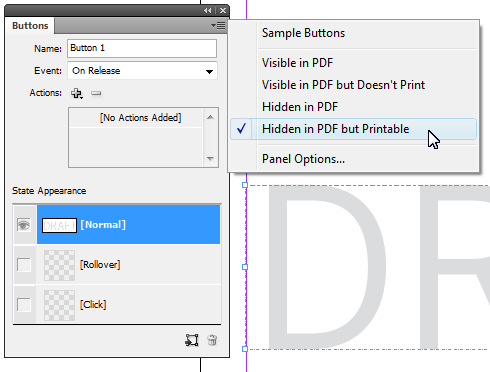
In CS3 right click the button and choose button options to set the properties for the button.
You can now turn the layer visibility off to get it out your way.
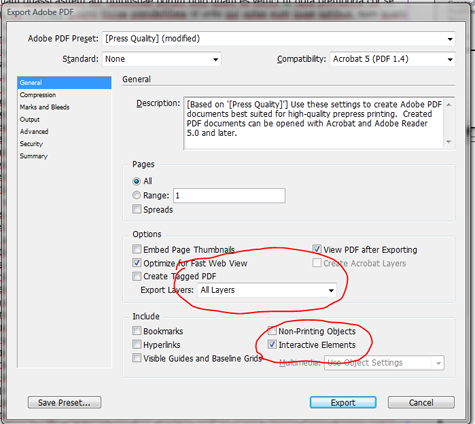
Finally, in order to make this work, you must select interactive elements and all layers (the default is visible and printable) when you export the PDF or the button, and therefore, your watermark will be excluded.
This article was last modified on December 20, 2021
This article was first published on October 9, 2009
Commenting is easier and faster when you're logged in!

Recommended for you

Using 3D in Affinity
Create rotatable 3D objects using Affinity and Canva AI with Steve Caplin.

Essential Illustrator Shortcuts
Save time with Kat Kremser's cheat sheet of Illustrator shortcuts!

How to Be a Better Designer: The Rules
Throughout this series, several themes have recurred: study graphic design histo...