



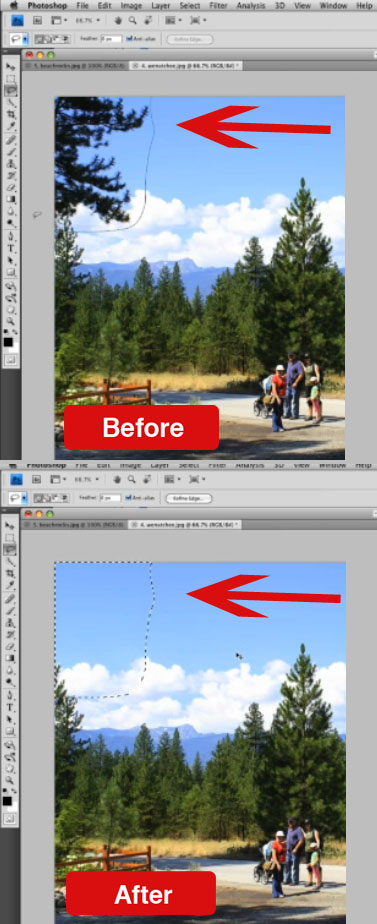
A four-person team (Connelly Barnes and Adam Finkelstein of Princeton University and Eli Shechtman and Dan B. Goldman of Adobe Systems) have been working on technology that fills in parts of an image you edit out more intelligently than Photoshop CS4’s Spot Healing Brush and Edit/Fill commands. The result is a “new randomized algorithm for quickly finding approximate nearest neighbor matches between image patches.”
Sound boring? Wait till you see it in action in a video on Adobe’s Facebook page. In the meantime, check out these before-and-after from the video:

This article was last modified on December 14, 2022
This article was first published on October 22, 2009
Commenting is easier and faster when you're logged in!

Recommended for you

Photoshop CC 2015.5 New Features
Adobe has promised subscribers to its Creative Cloud plan that it will release m...

Create Interactive Infographics with Infogr.am
Infographics can be a great way to make boring or obscure data into something be...
ClipDrop Review
ClipDrop offers a range of high-powered and occasionally unique solutions to eve...