



It’s time to reveal the solution—and the winner—for this month’s InDesignSecrets contest!
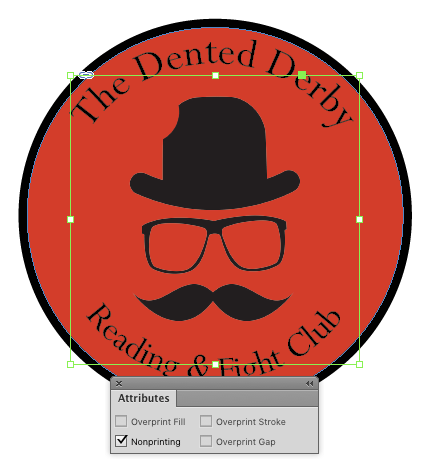
Here’s the scenario: You receive an InDesign file with a logo composed of a placed image, some type on a path, and a background circle with a red fill and black stroke.

When you deselect everything and enter Preview mode, the placed image disappears while the text and background circle remain.

If you go back to Normal viewing mode, the placed image reappears.
There are two reasons this can happen. First, the placed image can be set to be Nonprinting in the Attributes panel.
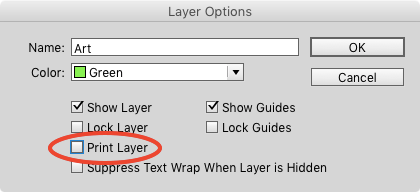
Or it can be on a layer set to be nonprinting in the Layer Options dialog box (which you can open by double-clicking the layer in the Layers panel).
And I am truly excited to report that everyone who entered the contest got the right answer! This is the first time that’s ever happened. Well done, folks!
And the winner of this contest (chosen at random from all the entries) is…
Mehmet Mese
Mehmet wins a copy of MathTools from Movemen!
Thanks to everyone who entered, and be on the lookout for another contest with a new great prize next month!
This article was last modified on July 25, 2019
This article was first published on February 14, 2016
Commenting is easier and faster when you're logged in!

Recommended for you

Tip of the Week: Numbering Above a List
Ever need to set two or more tables side by side in your layout? Here are three...
Noosh, Inc. Changes Name to NewlineNoosh
Noosh, a leader in Business Process Outsourcing (BPO) services and software solu...
New Contest! Identify the Adornments
Hey folks, it's time for another contest and a chance to win an awesome prize!