



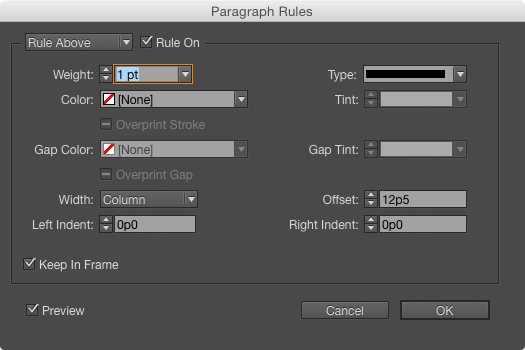
Last week I posted a challenge for folks to figure out why some text was sitting so low in a text frame, and I was blown away by the number and quality of the responses I got. Almost 200 folks responded, and out of those, 170 got the right answer: that there was a paragraph rule on the first paragraph in the text frame. The rule had a Color of [None] and was set to Keep in Frame. So even though it was invisible on the page, it pushed the text down by the Offset value plus the Weight of the rule (12p6 total).
And as promised, I picked five random names from the list of folks who solved the mystery to win a copy of the Top Tips for InDesign eBook.
The winners are:
Theo Duijkers
Obi-wan Kenobi
Gary Good
Joan Lordan
Sebastian Buzar
Congrats to the winners and thanks to everyone who took the time to send me their guesses! You folks are awesome. It was great fun for me reading all the emails from so many smart, nice folks from around the world. And if you didn’t win an ebook, don’t worry. We’ll have another contest here soon! Stay tuned.
This article was last modified on February 14, 2024
This article was first published on January 22, 2015
Commenting is easier and faster when you're logged in!

Recommended for you

Tip of the Week: Fancier Paragraph Rules
This InDesign tip was sent to Tip of the Week email subscribers on March 21, 201...

Version Cue Lives in CS5 (in Beta)!
If you have bemoaned the passing of Version Cue in InDesign CS5, it has risen ag...
Free InDesign and InCopy CS3 Trials Available
Adobe just made free trials available for all their web and design Creative Suit...