



Ahhh, Conditional Text. It is one of my favorite (and sadly neglected) features of InDesign. Conditional Text is most commonly used for showing and hiding different currencies within catalogs. It allows you to just change bits of text, while keeping the overall layout the same. The result is that you can have one document with multiple outputs. In this case, a single InDesign file can produce three different catalogs: for France, the US, and the UK.
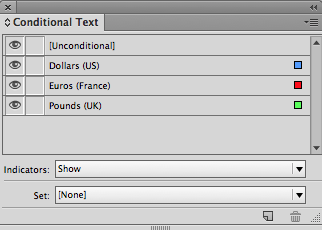
Conditional Text Panel
One of the shortcomings of conditional text is that you have to apply the conditions manually. The only way to (sort of) automate the process is by using the Find/Change dialog box.

Finding/Changing Conditions using the Find/Change Dialog Box
Here’s one idea for an improved Conditional Text panel: include the ability to automatically apply conditions based on the application of a specific character style. So as the text is styled with specific character styles, the application of conditions would follow suit.
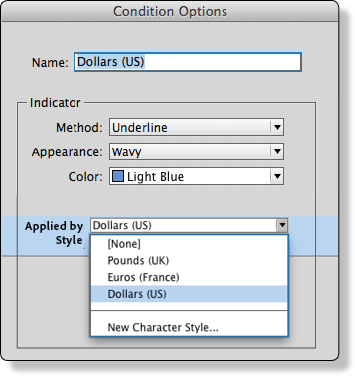
Kelly’s Redesigned and Completely Imaginary New and Improved Conditional Options Dialog Box
Thoughts? Do you use Conditional Text? Would this capability be useful to you?
This article was last modified on July 25, 2019
This article was first published on December 12, 2014
Commenting is easier and faster when you're logged in!

Recommended for you

Conditional Text Sunshine (making a cool design with an unexpected tool)
You can't really make page designs using the Conditional Text panel, can you? Ke...

Overcoming Limitations with Find/Change and Conditional Text
For those of you who are power users of conditional text, this post is for you....

I Should Have Known That
Sometimes you learn something that is new to you, but obvious to others. I compi...