




Ever since I started working with the first beta of InDesign (K2), I’ve been irked by the choice of the engineers to make leading a character attribute. I’d “grown up” with years and years of QuarkXPress and MS Word, where leading is a paragraph attribute. I remember during the InDesign beta, Olav Kvern tried to justify the decision to make leading a character attribute. But his examples were esoteric—or maybe I was just too dense to understand them. I’ve taught hundreds of hours of classes trying to explain to ex-Quarkers why the InDesign engineers chose such an option. But I couldn’t quite convince my students, as I myself wasn’t convinced.
Mike Rankin reminded me that using character-based leading was a key method for increasing leading in a line containing a built-up fraction, something you might use thousands of times over the course of producing a math book.

An example of how a character-based leading could be used to fix the leading for a stacked fraction. The fraction on the left needs more leading to fit properly on the line. The fraction on the right has a slight increase in leading.
But since I’ve never laid out a math book, I really didn’t see how important it would be for me.
Recently though, I created a design that required the first two lines of the introductory paragraph of a story to be a larger point size than the rest of the lines in the paragraph. What I wanted is this appearance:

An example of a paragraph where the first two lines are set in a larger point size and leading than the rest of the text.
To accomplish this, I knew I could use the Nested Line Styles option to change the size of the text in the first two lines. And it would also allow me to edit the text as needed without ever having to manually re-apply the character style.
So I created my paragraph style and then a character style that increased the point size of the text. This was the initial setting for the character style:
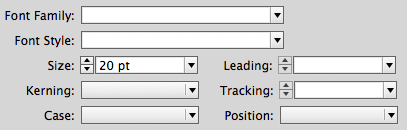
The character style options for increasing only the point size.
However, since I wasn’t using auto leading, this created a collision between the first and second lines of the paragraph. The leading also had to be increased.

A paragraph where the first two lines of text have had a larger point size applied. However, the leading is not correct.
So I changed the character style to also increase the leading:
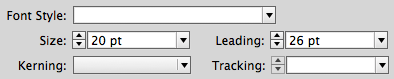
A character style that applies both point size and leading. If leading was a paragraph attribute, this would not be possible to set.
Once this new character style was applied in the Nested Line Styles option of my paragraph style, the first two lines worked perfectly.
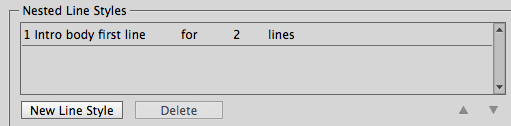
The Nested Line Style set to apply the character style to the first two lines of text.

Now the Nested Line Style automatically maintains the proper leading.
So, almost fifteen years after InDesign was released, I’ve finally become a believer of character-based leading! Olav, you were right!!!
This article was last modified on July 25, 2019
This article was first published on December 3, 2014
Commenting is easier and faster when you're logged in!

Recommended for you

Rein in Rogue Leading
Do the last lines of some of your paragraphs sometimes refuse to follow orders,...
The Zero Leading Solution
Through the use of zero leading, you can make text in separate paragraphs appear...
Significant Limitation in Nested Styles, Variables, and Section Markers
Sadly, trying to apply a nested style to a section marker (or other variable tex...