




Everyone needs help sometimes. InDesign CS3 and the CS3 applications now give you some new ways to find it: You can search Help on the Internet, or you can easily download a PDF file that you can search in Acrobat or Reader. In the future you may even be able to add your own comments to InDesign’s web-based Help pages.
You can get to the Online Help in InDesign CS3 the same way that you did in CS2 and earlier?by choosing Help > InDesign Help. This opens up a new application called Adobe Help Viewer 1.1. You can look through the Contents, which look like a book’s table of contents, to try to find what you want. You can use the alphabetical Index. Or, you can use the Search feature. There are, of course, the usual problems: If you know you want to delete InDesign’s preferences but can’t remember how to do it, searching for “delete preferences” won’t find it. You would have to know that it’s described in the Help files as “restore preferences.” Another problem is that the information sometimes may be incorrect or out-of-date.
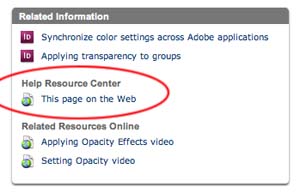
However, look at a couple new options at the bottom of the Help pages. Circled below is a link to the Help page on the Web. (Notice also the links to the videos we described in another posting.)
You can also get to the web-based Help pages from the Adobe Support pages: Here’s the link for the Help Resource Center. From this page, you can choose from the list of Adobe applications.

When you arrive at the InDesign & InCopy Resources page, you can choose between downloading the Help files as a PDF, which you can search in Acrobat or Reader. Or, you can choose LiveDocs. According to John Nack’s blog, LiveDocs is based on Macromedia web technology. (John is an Adobe Photoshop product manager.)
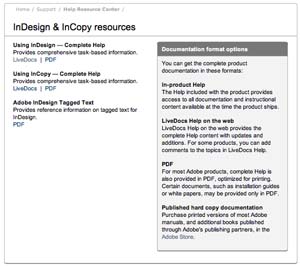
The LiveDocs pages look almost identical to InDesign Help Viewer pages. But they offer several advantages: (1) You can search for them in your browser. For example, in Google, search for “InDesign Help restore preferences” will get you to the right Help page. (2) These pages will be updated and added to in the future, according to resource page, presumably fixing the inevitable errors which creep into documentation which is written as the software is being engineered. (3) You can send a link to the page to help someone else.
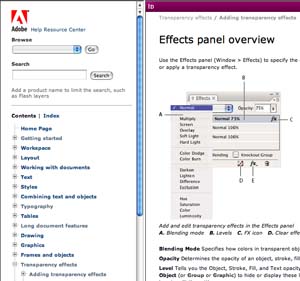
The Adobe Photoshop CS3 Help pages seem to be a testbed for another LiveDocs feature not yet available for InDesign/InCopy. As John mentions in his blog, you can add comments to the Photoshop web-based Help pages. Hopefully, they will add this feature to the InDesign/InCopy pages.
I agree with John’s conclusion: “Like most things, this is just one step, but I really like the direction of baking more community into our apps. Whether it’s help content, scripts, palettes, or anything else, we have to get out of the business of Adobe trying to do everything & make it easier for people with the know-how to share it with one another.”
This article was last modified on December 18, 2021
This article was first published on May 17, 2007
Commenting is easier and faster when you're logged in!

Recommended for you

Sizing Tables With a Script
Free script sets table properties that cannot be controlled by table styles, inc...
Beware The Double Effect with Object Styles
As you may have heard in Episode 69, when we interviewed Deke McClelland, he des...
Thinking about Upgrading to Creative Suite 4? Think Fast.
It doesn’t seem that long ago that Adobe had the most liberal upgrade poli...