




The Object > Transform Again commands have been written about previously, here and here. But every time that I use these commands it saves me so much work, I just have to tell someone about it! Since I’m all alone in my office, I’m going to tell you about it. Here is what happened today:

A tough layout problem…each box is a slightly different size, but they need to all be the same size.
I inherited this layout, and my job was to animate the colored squares for an Adobe Digital Publishing Suite tablet publication. Upon close examination, I noticed that the squares were all slightly different sizes, and their corners didn’t align precisely. So I decided to make all the squares exactly 60 pixels square. Of course, selecting a single square, adjusting the width and height values in the Control panel, and then repeating these steps dozens of times would be fine if I were a patient man and being paid by the hour.
But I’m neither patient nor hourly, so this is what I did.
1. Select one square, and make it exactly 60 px square in the Control panel.
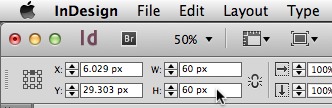
Use the Width and Height values to specify the desired size.
2. Select all the squares, and choose Object > Transform Sequence Again Individually.

That’s it. Now every square is magically exactly 60 pixels square! Once the images were the same size, I used the alignment panel to herd them into precise rows and columns.

Here’s the “back story” of what is going on. Transform Again just repeats the last single transform (size, scale, rotate, etc.) that you did recently. Transform Again Individually will apply that single transformation individually to a bunch of selected items. Transform Sequence Again repeats the last uninterrupted sequence of transformations (in this case a Width change immediately followed by a Height change). The command I used, Transform Sequence Again Individually applies the last uninterrupted sequence of transformations individually to a bunch of selected items.
I had to transform a “sequence” because I had made 2 transformations, the Width and the Height. I had to do the transform sequence again “individually”, otherwise the entire selection of dozens of boxes would have been resized to fit an 80px by 80px area. Instead, I wanted each box to be resized individually.
I hope you have a chance to use this powerful feature in one of your projects soon!
This article was last modified on December 30, 2021
This article was first published on December 6, 2013
Commenting is easier and faster when you're logged in!

Recommended for you

Fun with the MakeGrid script
Keith wastes way too much time playing with the handy MakeGrid script that's inc...

How to Control Stacking Order with Step and Repeat in InDesign
Frustrated by the stacking order of objects being the opposite of what you want?...

New Contest! The Transform Panel Mystery
Hey folks, it’s time for another InDesign mystery that you can solve for a...