



Excerpted from InDesign Type: Professional Typography with Adobe InDesign CS2. Published by Adobe Press.
In this article, you’ll look first at tabs and some of their common uses, and then at InDesign’s robust and versatile table-formatting features. By the end, you’ll be at ease with most any layout that calls for lists.
We’ve posted this article as a PDF file. To open the PDF file in your Web browser, click “Lists.” You can also download the PDF to your machine for later viewing.
To open the PDF, you’ll need Adobe Acrobat or Adobe Reader.
To learn how to configure your browser for viewing PDF files, see the Adobe Reader tech support page.

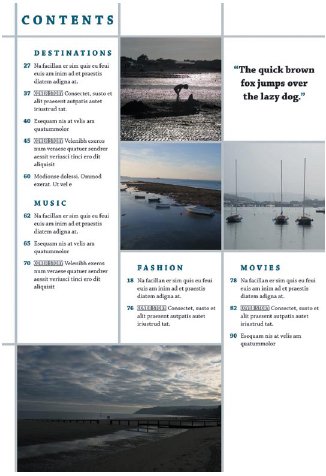
This magazine’s table of contents page uses a clearly defined grid that is a good candidate for a table. Using a table in such a context can make it easier to edit the text and images in individual cells in following issues of the magazine.
Excerpted from InDesign Type: Professional Typography with Adobe InDesign CS2 by Nigel French. Copyright © 2006 Nigel French. Used with permission of Pearson Education, Inc., and Adobe Press.
This article was last modified on January 18, 2023
This article was first published on October 4, 2006
Commenting is easier and faster when you're logged in!

Recommended for you


Scanning Around With Gene: Illustrations Carved in Steel
I recently came across an 1883 edition of “Mountain, Lake and River” with illust...

A Different Light: An Introduction to Infrared Photography
Learn how to capture images in a whole new light.