



I.E.S. writes:
I hope this is an easy fix. You know the opening splash page so you can click on a file and open it? Well, while I was on vacation my supervisor had to use my computer. Somehow she made it so that opening page doesn’t show. Is there a way to fix that without having to delete my preferences?
Why is it Missing?
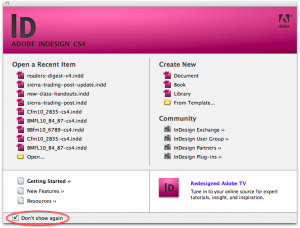
When you first install and launch Adobe InDesign (or some other Adobe Creative Suite products) you are greeted with a handy welcome screen as you launch InDesign. If you are not a fan of this welcome screen you can turn it off by clicking the “Don’t Show Again” check-box in the lower left hand corner of the welcome screen window. This is probably what your supervisor has done to your computer.
Bring it Back!
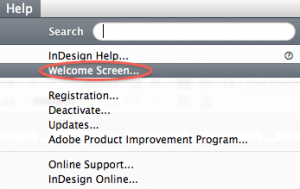
To bring back the welcome screen go to your help menu and choose “welcome screen”. After the welcome screen comes back, don’t forget to uncheck “Don’t Show Again” .
Why Even Use the Welcome Screen?
Some people may not like the welcome screen and think it is just a waste of screen space. There is quite a bit of useful information available in this welcome screen that you may not be aware of.
- List of recently opened documents
- 1-click to create a new document, book or library
- Link to InDesign’s Free Templates
- Links to the Adobe Exchange, InDesign user groups, partners and plug-in directory
- News from Adobe
- Help resources
This article was last modified on December 17, 2022
This article was first published on January 7, 2010
Commenting is easier and faster when you're logged in!

Recommended for you

New Contest! Solve the Mystery of the Missing Image
Last month, many of you enjoyed solving the mystery of the low first baseline. S...

Adobe TV is On the Air
Adobe TV debuted today with a wealth of ready-to-view video content, much of it...
The Dual Text Wrap Dilemma
Although you cannot apply an inverted text wrap and a traditional text wrap to t...