



With every new release of InDesign comes new features. Sometimes, however, adding something results in the removal of something else. Such is the case with the navigator panel. A mainstay for as long as I can remember it was a handy way to get around a document. There were some issues with it, however. For one, you’d have to remember it was there and I’m one of those out-of-sight-out-of-mind kind of people so I rarely used it. Another problem was that it relied on a proxy that had to be continually redrawn. This tended to slow things down a bit.
Remembering it’s existence is no longer an issue with CS4 because it’s been removed. Instead a new feature has been introduced but judging by some comments I’ve read on various lists and forums, it seems to be just as overlooked as the navigator panel. That feature is called power zoom and for those of you unfamiliar with it, it works in a very similar fashion to the navigator panel but it works on the actual document window instead of relying on a panel with a tiny proxy image.
To take advantage of the power zoom feature, select the hand tool and click and hold anywhere in the document window. Why click and hold? Because the power zoom feature takes advantage of what Adobe likes to refer to as “patient user mode.” [note: This is the same mode that makes it possible to see live previews of text wrap and how much of an image is outside a frame while moving it.]
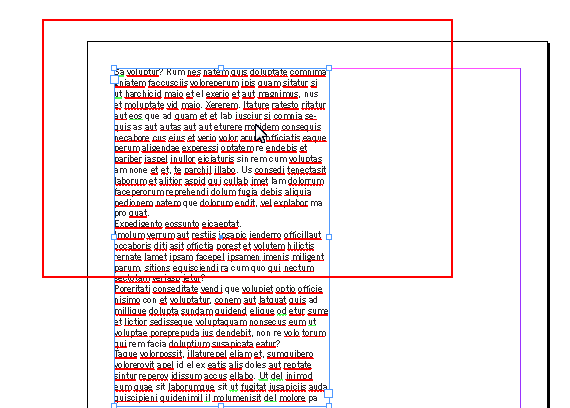
You can then use either the scroll wheel of your mouse or the arrow keys to zoom in or out and drag the mouse to navigate around the document.
For those who use the hand tool to move the page view around on screen, this may cause a bit of confusion at first. You’ll need to click and drag pretty quickly or the power zoom will kick in. Once you get use to it, however, I believe you’ll find this to be a vast improvement on the old navigator.
And while it’s not likely to ever come back to InDesign, if you really miss it, you can always open Illustrator or Photoshop. Both applications still have the navigator panel.
This article was last modified on December 19, 2021
This article was first published on April 16, 2009
Commenting is easier and faster when you're logged in!

Recommended for you

60 Minutes…
An answer to the question: How do I create dots for all the minutes on a clock f...
Locking Objects For Easier Aligning
A quick tip on how to make any object the "key object" when aligning.
Synchronize Text in More Than One Place in an InDesign Document
Need to synchronize a bit of text from one place to another in a document? It's...