




Here is the weirdest InDesign bug I’ve seen in a while, shown to me by Caleb Clauset while we were at PEPCON: The Print + ePublishing Conference last week. Caleb works for Typefi, and he presented at the InDesign Automation session. Because of his work, he is a lightning rod for all kinds of bugs and oddities from Typefi’s many clients, and often needs to find clever workarounds for problems that Adobe isn’t able to fix quickly.
This bug is simple to reproduce, and I can see how it could easily bite someone unawares. First, create a group of objects on a master page and apply text wrap to the group. (Or, assign text wrap to two or more objects on the master page and then group them.) Next, create a text frame on a document page so that it wraps around the master page item/group:
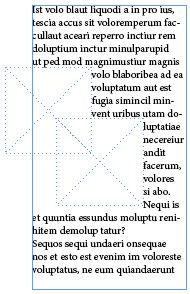
So far, so good — that looks like it’s supposed to. Now Command-Shift-click (or Ctrl+Shift+click on Windows) on one of the wrap objects on the document page. That overrides them — takes them off the master page and makes them editable on the document page. Okay, ready? Now delete them.
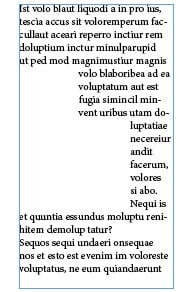
What’s wrong with the picture above? There is no object causing text wrap, but the text is being wrapped anyway! No matter what you do — even if you move the text frame, or delete all the objects on the document page and create new text frames, or remove or add pages — the text wrap remains! Even if you It’s like a ghost that just won’t go away.
In other words, text wrap applied to objects in a group (or to the group itself) affects objects on document pages, even if those objects aren’t technically even on the document page. As far as I know this happens in CS5 and CS6.
What can you do about it? Umm? don’t group objects with text wrap on the master page until Adobe gets around to squashing this bug!
This article was last modified on December 30, 2021
This article was first published on May 4, 2013
Commenting is easier and faster when you're logged in!

Recommended for you

Help Squash This Bug: Placed Images Showing Outside the Frame
Here’s an annoying little InDesign bug that maybe we can get Adobe to finally sq...

InDesign 14.0.3 Available Today
Check your Creative Cloud app, because an update to InDesign (14.0.3) is schedul...

Polaroid Pix
As we've learned from the new user forums, there's more than one way to make a p...