



Yes, that’s right, it’s time for another episode of your favorite show: You Need a Script! Today’s contestant is Paul, who wrote:
I am currently training in a newspaper workflow where they generally design in single text frames divided into columns. They are looking for a script that will break these columns into linked frames with the copy running through them as before. They sometimes need to do this so as to make one column wider than the others.
Paul, what can I say? (Everyone join in) You Need a Script!
Unfortunately, when you wrote to us, such a script didn’t seem to exist. So we turned the thumbscrews on our friend Steve Wareham, who wrote one up in a jiffy. Once you install the script (just put it inside the Scripts Panel folder on your hard drive) you can select any multi-column text frame, then double-click on the script to convert the columns to individual frames. It’s awesome!
Before:
After: 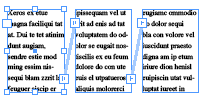
You can find the Columns2Frames.jsx script by clicking here. (It’s a zipped file for easy downloading; don’t forget to unzip it!)
[Here is a CS5 version of the script in zip format.]
(Folks, if you find yourself in need of a feature that InDesign doesn’t have, you might want to contact Steve or another scripter to help you achieve your goals. Then, if you think others might benefit from it, let us know and we’d gladly post it and give you credit for it. We’re working on compiling an index of scripters)
By the way, Paul followed up with us, noting, “The script does exactly what is needed. Brilliant job. Although many people will wonder why this script is needed, the fact is that newspapers often need — at very short notice — to extend one column longer than other or extend one column wider or narrower around an ad.” Excellent point! Another option, for those who haven’t seen it, is the SmartLayout plug-in from Woodwing. It’s pretty amazing, but also more expensive, of course.
This article was last modified on December 19, 2021
This article was first published on October 7, 2008
Commenting is easier and faster when you're logged in!

Recommended for you

Make It Look Like a Book in the Acrobat PDF
Laying out a document in facing pages isn't that hard. Displaying it as facing p...
How Can I Align Double Digits in a Numbered List?
Question: What is the secret of getting numbers to align correctly in numb...
Assigning Default Text Formatting
FS wrote: I always use the import options dialog box to remove all formatting fr...