



Many companies and governments now standardize on specific readability levels — that is, how educated does someone have to be in order to read the published text? 5th grade? 7th grade? University level? There are a number of ways to check readability, but the only way to do this inside InDesign that I know of is to use the Readabilities plug-in from I.T.I.P. (the makers of the highly respected InMath plug-in), in conjunction with aextra software.
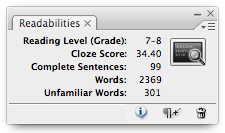
Readabilities offers a panel that can detect the reading level of any story. Just place your text cursor in a story, click the blackboard button in the panel, and it quickly gives you information about it. It’s very fast and easy to use.
Currently, the ?99 plug-in only works with the New Dale-Chall Readability Index (which is reportedly good for grades 1-16, in American English), but the plug-in is itself extensible to use other readability dictionaries, too. I believe ITIP will be offering more dictionary options as time goes on, but if there are particular needs you have, feel free to comment below or contact them.
This article was last modified on December 19, 2021
This article was first published on September 19, 2008
Commenting is easier and faster when you're logged in!

Recommended for you

What’s New in Creative Cloud 2024
Learn how Adobe is using generative AI to transform Creative Cloud

How to Find Overset Text in InDesign Fast
InDesign tells you that you have some overset text, but sometimes it's hard to f...

How to Mirror a Layout
Flipping a whole layout from a left to a right hand page doesn't have to be a pa...