



Are you feeling limited or even trapped by the measly 1,000 or so spot colors available in the Pantone spot color libraries? Good news: Pantone has recently introduced a brand new spot color system, the Pantone Goe system. The Goe system adds 2,058 new colors for the color starved designer. The original Pantone Matching System libraries will remain in place so there’s no worries about finding replacement colors.
Of course, this brings up the usual question about new or updated color libraries…when will they be available in my favorite applications? Fear not! The answer is, right now.
Pantone is offering a free download of new libraries. Just visit the What’s Hot page on Pantone’s website and look for the link to download the libraries. You will need to register in order to download the installer but it’s free to register and won’t take but a minute or two.
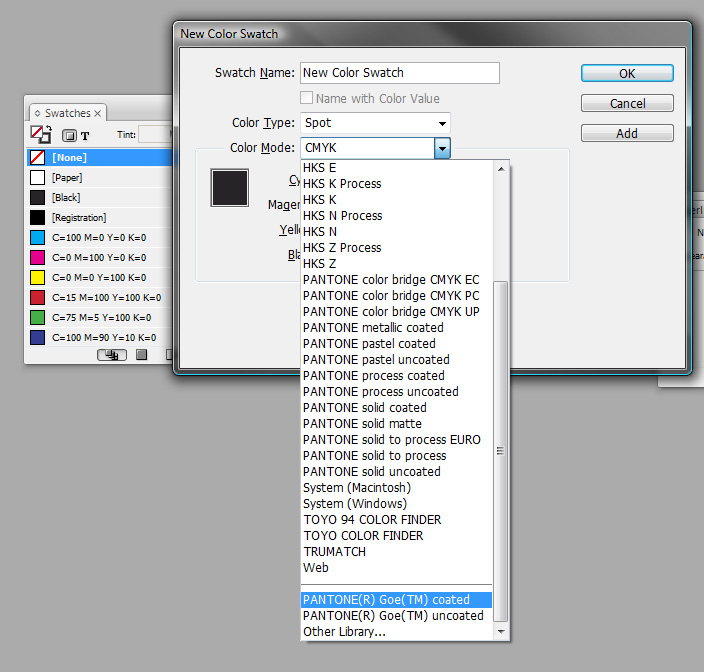
Installation couldn’t be any simpler. Just download the installer and launch it. It will search your computer for any instance of Photoshop 7 or later, Illustrator 9 or later, and InDesign CS or later and will install the color libraries. To use them in InDesign, just open the flyout menu from the swatches panel and choose new color swatch. From the Color Mode drop down scroll to the bottom of the list where you’ll find the coated and uncoated libraries.
For more details on this new color system and how it differs from the original, Pantone has posted a PDF of FAQs that discusses this new color system.
This article was last modified on December 19, 2021
This article was first published on August 1, 2008
Commenting is easier and faster when you're logged in!

Recommended for you

Ruling headers… (or, Placing a Rule Behind a Header)
Consider this part 2 in the series 'working with text on a tinted background'!

The Swatch Panel’s Stealth Feature
The Eyedropper Tool has been with us for a long time. It’s a fantastically...

CreativePro Week Conference Speaker Spotlight: Erica Gamet, GREP Queen
Fun facts about some of our favorite people, the speakers at our upcoming PePcon...