




Colette wrote to us wondering about that alarming message that sometimes appears when you print from InDesign:
This document may contain binary EPS files, which can cause the print job to fail. If the printer produces output, then the binary did not interfere with printing. Do you want to print this document?
This message has freaked out InDesign users for years (probably since 1.0). Might fail? Binary EPS files? What?!
Take a deep breath. Don’t panic. A binary EPS file is simply an EPS file (encapsulated postscript) that contains some image data in it (generally a bitmapped image) that was encoded (“the way it was written in the file”) using binary data (zeros and ones).
In the vast majority of cases, it is totally safe and reasonable to print these files. However, some printers and some networks (extremely old ones, I believe) can’t deal with binary data like this because it contains chararacters that freak out the printer. For example, a certain binary sequence may fool the printer into thinking it has been sent a “Ctrl-D” character, meaning “Reset!” So the job fails. But honestly, I just haven’t run into this in… well, actually, I don’t think I’ve ever had this problem myself in 20 years of printing files.
In fact, in many cases, the EPS file itself doesn’t even have binary data. Old EPS files especially can trigger this message — even ones that don’t even contain any bitmapped images.
So I see that alert and I ignore it as just one more harmless but pesky fly buzzing around.
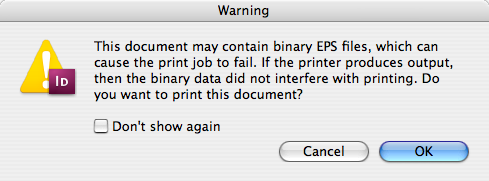
In fact, I typically turn on the Don’t Show Again checkbox, click OK, and don’t worry about it (until the next time my preferences get reset and I see these alerts again).
This article was last modified on December 18, 2021
This article was first published on April 21, 2008
Commenting is easier and faster when you're logged in!

Recommended for you

Go to Page
Using InDesign's Go to Page tool you can go to another page in the active docume...

Talk Back to Quark: The Scoop on Mobile Licensing
In my article on the Quark Summit in Breckenridge, I reported that Quark announc...
Wizard of Oz FX: Ruby Slippers
Are you ready to make some ruby slippers like Dorothy's from the Wizard of Oz? J...