


How to Be a Better Designer: Step Away from the Computer!
Look away from the screen to find yourself as a designer


This article appears in Issue 53 of CreativePro Magazine.
You’re eager to get started on a new brief. You open InDesign, poke around in a few features you’ve been meaning to explore, try out a technique you recently discovered, fire off a quick reply to an email that can’t wait. You drift onto social media for a moment. Then you check your bank balance. Then you notice there’s a software update available, so you start the install. While it’s running, you check your email again. Then make another coffee. You remember you promised to send a photo from last weekend to a friend. Before you know it, hours have passed. You’ve been busy the entire time, yet very little actual designing has taken place.
We’ve all been there. And we’ll almost certainly be there again.
The problem is that we’ve skipped the most important part of the process. We’ve tried to jump straight to the solution without first understanding the problem. Our computers make this easy. They promise speed and efficiency. They offer the illusion of progress. Within a short amount of time, we can have something on screen that looks nearly finished. After an initial sprint, we can feel 90 percent done. The problem is that without a clear idea driving the work, that final 10 percent may prove elusive, and end up taking a lot more time.
The Tweaking Spiral
Computers are seductive. They make it easy to produce something slick and polished, but slick and polished don’t necessarily mean effective. They don’t guarantee clarity, meaning, or purpose. Design software encourages us to zoom in, refine, adjust, and tweak endlessly. The number of options available to us can be overwhelming. We nudge elements a fraction to the left, adjust the opacity a few percentage points this way or that, try one more variation—more because we can rather than because we think we’re on to something. Sometimes this attention to detail is exactly what’s needed (see part 8 in this series, “Sweat the Details”). But sometimes, it’s simply a way of avoiding a harder truth: The idea itself isn’t strong enough yet.
Tweaking has its place. It can elevate something good into something great. But only if there’s something solid beneath it. When the foundation is weak, all the refinement in the world will produce only a better-polished version of a weak idea. You end up with something that looks professional but is boring and says little.
That’s why stepping away from the computer is so important.
Think, Explore, Sketch
Before you lift the lid on your laptop or fire up your multi-screen mission control center, you need to think. You need to explore. You need to sketch. It doesn’t matter how rough or awkward those sketches are. Mine are often embarrassing—full of stick figures and illegible (except to me) scrawlings. That’s beside the point. Sketching isn’t about producing something presentable. It’s about thinking. The act of drawing engages your brain in a different, more direct way. It encourages exploration without commitment.
On paper, bad ideas reveal themselves quickly. And you’re going to have some bad ideas. Everyone does; it’s part of the process. You may as well get them out of the way first. With pencil and paper, you can work your way through those obvious solutions and clichés in a matter of minutes, rather than have your software lead you down the garden path to a red-eye, back-aching session, the result of which, despite its flair, is uninspired and fails to meet the brief.
Sketching gives you permission to fail quickly and cheaply. The process helps you separate the obvious from the interesting. With the clichés out of the way, you can home in on the original thoughts and good ideas. Once these are cooking—and only then—are you ready to reach for your mouse or stylus and start working at the computer.
Observe and Recharge
Spending less time at the computer doesn’t mean spending less time designing. Design doesn’t stop when you step away from your desk. Work/life balance is a nice idea, but outside of work, designers are in standby mode, never off. Everything around us is grist for our mill. It becomes a way of seeing the world. You start noticing the spacing on street signs, the hierarchy of information on packaging, the rhythm of type on a poster, the way color is used to guide attention. You start asking questions: Why this typeface? Why this scale? Why this layout and not another?
Inevitably, inspiration ebbs and flows, and when you run out, you need to recharge. Over time, you discover what works for you. For me, that might be a serene walk through a country churchyard (Figure 1) or a frenetic ride on the London Underground, studying the advertising posters that compete for my attention on the platforms and as I ride the escalators. Some are brilliant. Some are terrible. All of them have something to teach.

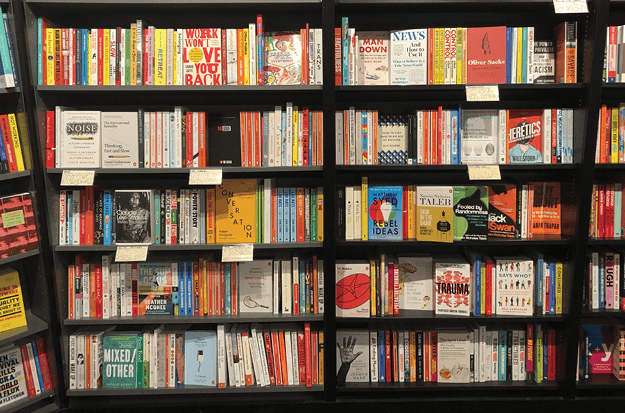
A visit to a bookshop (Figure 2) or a record store (if you can still find one) never fails to provide new ideas—rows of covers, all of them carefully crafted by their creators, each trying to communicate something in a split second.
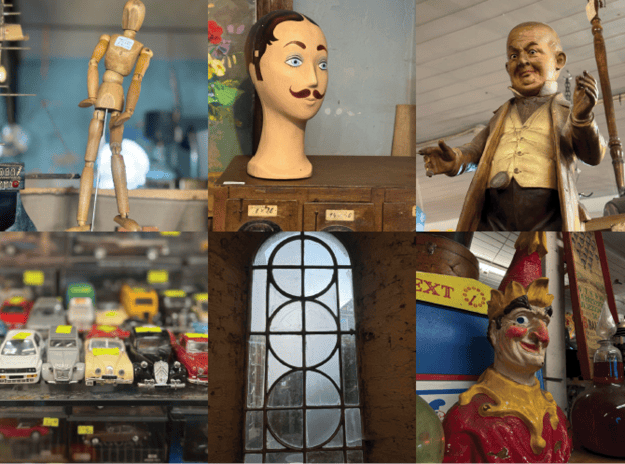
Flea markets and antique shops are treasure troves of forgotten styles, old solutions, and design thinking from another era, waiting to be rediscovered (Figure 3).
Your immediate environment is richer than you think. Take a walk around your neighborhood and really look at it—even if you’ve been walking the dog around the same block for years and feel like you could do it blindfolded. How does it look at different times of day? In different seasons? Photograph what catches your eye: the big, the small, the overlooked. Set yourself constraints: 10 photos, 1 block, 15 minutes. Constraints focus your attention. They compel you to see more clearly and more creatively.
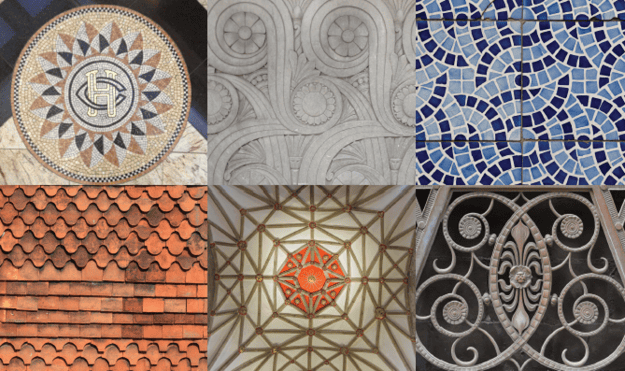
Take inspiration from the buildings around you. After all, many graphic designers approach their work as page architects, constructing layouts in a modular way not unlike the way an architect might construct a building. But pay attention to more than the general form; look—really look—at the small details. Those embellishments may have been some craftsperson’s life’s work but most people don’t even know they’re there (Figure 4). What do they signify?
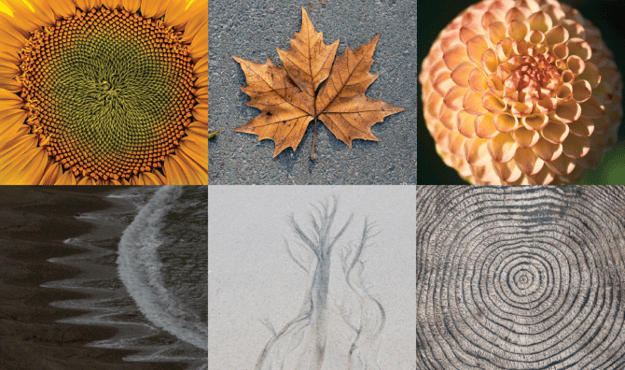
Nature, too, is an endless source of ideas. Patterns, textures, proportions, and color relationships are everywhere if you take the time to notice them (Figure 5).
Background Rhythms
Capture what you see. Build a personal library of references. Start a Pinterest board or other type of mood board. Our minds work in mysterious ways—even the most unlikely raw material can lead you towards a new solution or personal project.
But then again, maybe it won’t. At least not directly. Not everything will have an immediate use, and that’s fine. Much of what you absorb works quietly in the background, shaping your instincts and your taste over time. If nothing else, you will see interesting things (or find things more interesting, which amounts to the same thing). Even if they don’t have an obvious or immediate connection to your work life, these loose strands ultimately factor, in some small way, into creating your own unique design sensibility (Figure 6).

If you use Lightroom Classic, keyword your images. Once you notice you’re applying the same keyword to multiple images, make a Smart Collection. That way, your topics will organize themselves in the background—you may be surprised how quickly themes emerge, some of which you may not have been fully conscious of.
Beyond Pretty
All of this is research. All of it feeds your work. Even when it doesn’t seem directly relevant, it’s forming connections that will surface later in unexpected ways. Good design is not just about making things look pretty. It’s about understanding problems deeply and responding to them with clarity, intention, and nuance—something that, for now at least, humans do better than AI. That understanding begins long before you sit down at the computer.
Commenting is easier and faster when you're logged in!

Recommended for you
How to Be a Better Graphic Designer: Keep It Simple
In a world that shouts, the voice we truly hear is the one that speaks with calm...

17 Great Tools for Designers
Every designer, regardless of their niche, needs certain tools of the trade to g...

InDesign Magazine Issue 122: Cross-Media Color
We’re happy to announce that InDesign Magazine Issue #122 (June 2019) is no...