


Reply To: Size and Position options in Object Styles

Home Page / Forums / General InDesign Topics (CLOSED) / Size and Position options in Object Styles / Reply To: Size and Position options in Object Styles

#14339511
David Blatner
Keymaster

I agree that this can be confusing at first. The little “reference point” boxes mean “the part of the object you’re controlling.” However, you can only base the page measurement on the upper-left corner of the page. So, for example, if you want to put the upper-right corner at 1/2 inch from the right side of an 8.5″ page, you’d set it to 8″.

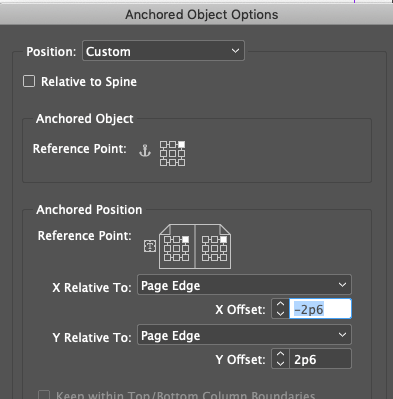
As it turns out, there are much better controls when it comes to anchored objects. For example, here’s how you’d do it if you were anchoring the upper-right corner of a frame to the upper right corner of the page:

But of course, this requires you to anchor it in a text frame… not just loose on the page.

This article was last modified on May 26, 2021

Comments (0)

Loading comments...


