



I had been getting the whiff of disaster for a month or two about the Help files in InDesign CS6, and the rest of the Creative Suite. As a beta tester, I usually get an early look at the Help files but they were curiously missing this time, except for a brief What’s New in CS6 section.
When I looked at the online Help the first time after InDesign CS6 came out, my reaction was, “Is that all there is?” Major topics were left out, and the content was choppy and disorganized. There were no PDF files. Later, we were told that the PDFs would come out by the end of June.
Well, the InDesign CS6 Help PDF is now here, along with those for the other CS6 products, and it’s just as bad as the Online Help. First, you have to find the PDF file because, unlike in CS5 and 5.5 Help, there is no obvious link to it. If you start at the InDesign CS6 Menu, you logically choose InDesign Help as before.
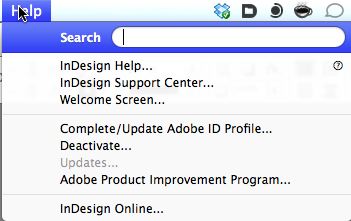
This takes you to the InDesign Online Help which requires Internet access. It looks quite nicely designed but is pretty useless for finding topics except for the simplest top-level choices. There is no organized topic list or index. And the search is pretty miserable. Even if you specify results from InDesign it mixes in results from other applications (search for effects, and it includes Adobe After Effects). And no link to the PDF file.
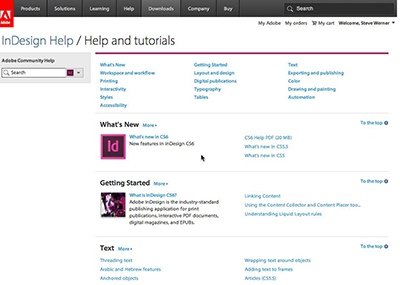
InDesign Online Help
To find the PDF file, instead of choosing InDesign Help in the Help menu, choose InDesign Support Center.
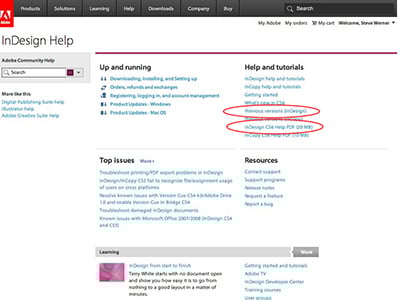
InDesign Support Center
Over on the right are links to the Help PDF (circled below), and previous help files which are also PDF files (circled above). But they messed up the PDF files too. I already had the InDesign CS5 & 5.5 Help PDF, and I compared it with the InDesign CS6 Help PDF.
In CS5 & 5.5, the Help was organized in 25 logical chapters. You could open the bookmarks for each chapter, and you could see subbookmarks and sub-subbookmarks to see a logical hierarchy of topics. Often that was enough to navigate to the topic you were looking for. For example, here is a portion of the bookmarks on Tables:
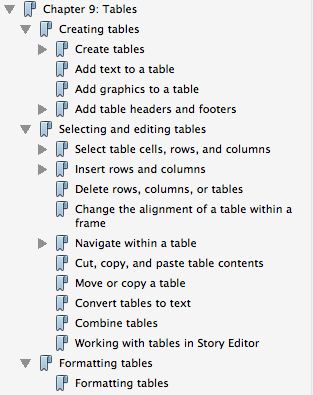
Bookmarks in CS5 & 5.5
In the CS6 Help file, there are 16 topic areas, and here is what the Tables topic looks like in the bookmarks:
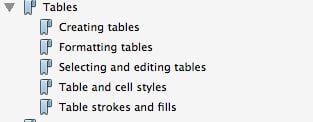
Bookmarks in CS6
That’s it. To find a subject related to tables you have to make your best guess, then scroll through to try to find what you’re looking for.
It gets worse. If you have a longer topic, the subtopics are not arranged in a logical order for someone who is learning the subject, they are arranged alphabetically. Say you wanted to try to find out about the settings in InDesign’s Print dialog, probably the most common search for a beginner. In CS5 and 5.5 Help, that topic is logically placed first:
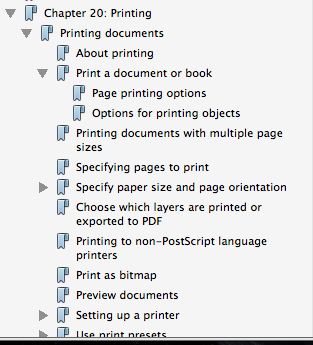
Print Topic in CS5-55
Look at the Print topic in InDesign CS6 Help:
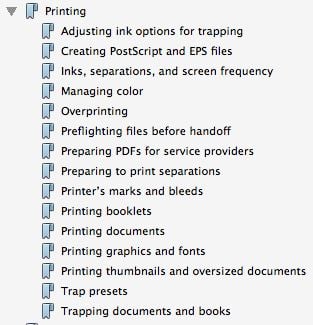
Print Topic in CS6
A beginner has to figure out that what they want is most of the way at the end in Printing documents.
And it gets even more infuriating: Important topics are hidden in unlikely places. There used to be a logical chapter on Long Documents. Now it’s a mismash: Creating an index is placed in the Text topic. Creating a book file is in the Layout and design topic.
Other topics are only available in the Online Help (it’s not like it costs more to produce a longer PDF!) Look for something basic and important like creating an InDesign Template. You’d expect it would be in the Create new document subtopic, right? If you scroll to the bottom of that subtopic, you see these links:

Topics Not in PDF
These are links to the Online Help! You can’t read them in the PDF document. Why? I have no idea.
The CS 5 & 5.5 Help was 705 pages. The CS6 PDF Help is 621 pages. That includes an oddly arranged What’s New section that includes What’s New in CS6, CS5.5, CS5, Arabic and Hebrew features, Liquid Layouts and Alternate Layouts, Forms. So material was moved out of the PDF for no apparent reason.
It’s not only InDesign users who are unhappy with the Help files, other Creative Suite 6 customers are as well. You can read some of their comments on the Community Help Application forum. Here are a couple threads of complaints:
Adobe Help Is Purposely Gimped.
It’s too bad that the help Adobe provides for its increasingly more powerful and complex applications gets worse and worse. It means that you’ll have to rely even more on websites like this, books like Real World InDesign and InDesign Visual QuickStart Guide, and online and in-person instruction to learn InDesign.
This article was last modified on December 21, 2021
This article was first published on July 8, 2012
Commenting is easier and faster when you're logged in!

Recommended for you

Creating Custom Default Swatches
When you open InDesign you are greeted with a few default swatches, styles, and...

Customizing PDF Presets
My other two postings about PDF presets?Choosing the Right PDF Preset and Creati...
Getting Cool Illustrator Gradients Into InDesign
As Pariah mentioned a while back, the ASE (adobe swatch exchange) system is grea...