




A frequent topic of conversation in these blogs and elsewhere is how to view previews of InDesign files. One solution has been to view files in Adobe Bridge. But I don’t always have Bridge open, and I’m usually wanting to view a file while I’m working (in the Mac Finder, or when in an application like Mail, or when I’m opening and placing a document). I don’t want to open a separate application. Another method which Anne-Marie suggested is using the Adobe dialog box, but that has similar limitations.
Leopard, the new Mac operating system (OS X 10.5), has the capability of previewing many file types using a new feature called Quick Look. Pressing the space bar when you have any file selected gives you an instant preview of PDF files, Word files, Photoshop files. Almost any kind of file format except InDesign and Illustrator files. This same capability extends to seeing previews in other Finder views like column view, in Open dialog boxes, and elsewhere. It’s totally integrated into the operating system. But the Quick Look feature has hooks so developers can us it in their applications as well.
Code Line Communications, the developers of Art Directors Toolkit and Art Files, have just released SneakPeek Pro, an operating system plug-in that lets OS X Leopard users preview their InDesign, Illustrator and EPS documents without launching an application, or using Bridge or the Adobe dialog. For CS3 documents, it promises to provide a list of fonts, images, and swatches when in Quick Look view.
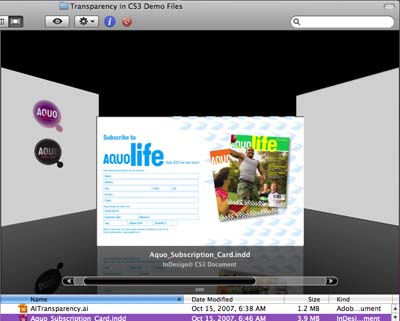
Here is a preview of an InDesign file using Cover Flow, the new view mode now incorporated in the Leopard Finder:
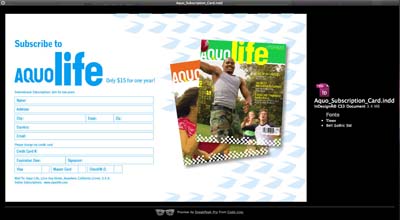
Here’s the same file previewed by selecting its icon and invoking the Quick Look keyboard shortcut from the Finder. The fonts used are listed to the right of the preview:
And here is an InDesign file previewed from within the InDesign Open dialog box (without using the Adobe dialog):

The utility costs $14.95, and is listed as being a $5 off introductory price.
A couple of caveats: The software is very new (version 1.0), and there still seems to be some minor bugs and limitations. The release notes say that some documents do not display thumbnails properly in Cover Flow, but work elsewhere. I found the InDesign CS3 documents I tested showed the fonts used, but didn’t display images and colors in Quick Look.
And, as I posted before, Leopard is not totally compatible yet with InDesign CS3. There are still annoyances like not being able to hide the application. In some cases, I’ve had to force quit the application. But I’m sure those will be fixed before long with either another Leopard update or an InDesign update.
When everything is working, this will provide Macintosh users a super way to preview your InDesign and Illustrator files.
This article was last modified on December 18, 2021
This article was first published on November 30, 2007
Commenting is easier and faster when you're logged in!

Recommended for you

Index Fixes: Multiple Indexes in an InDesign Document
InDesign documents can contain only one index. But when you need more than one i...

Quick Wins: Adjusting Color in Photoshop
Use these five resources to get better at adjusting color in Photoshop
Using 3D in Affinity
Create rotatable 3D objects using Affinity and Canva AI with Steve Caplin.