



After running Mac OS X 10.3, or Panther, for a couple of weeks, my first impressions are confirmed: The upgrade is a solid piece of work (and no matter the two maintenance updates in the span of a week or so). However, even with that upbeat experience, still I wonder whether Panther’s mix of 150 new features has the necessary claws to drag over content professionals still clinging to the Classic Mac platform.
As I mentioned in my previous column, the most prominent feature of Panther is Expose (although some readers might instead point to the new opaque windowing scheme and its use of bright colors to identify files, as shown in Figure 1).
Expose — Panther’s window-based navigation scheme for seeing files on the desktop — is a compelling addition to the Mac interface, perhaps an inspired piece of design. My appreciation keeps growing as I use it, fitting its use into my workflow. Just as Expose helps my productivity, it’s also a minor time-waster since I keep showing it off to everyone I meet. Some longtime Mac users consider it one of the most significant interface additions to the platform in more than a decade.
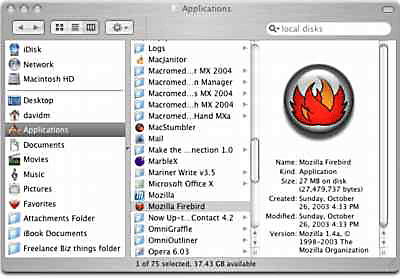
Figure 1: It will take a bit of time for me to love the new Finder windows with their left-hand set of icons of primary folders and shortcuts. No doubt, I will grow used to them. That reticence isn’t the case with Expose navigation, which is instantly understandable and desirable.
Now, a major step in a desktop interface is all well and good in theory; but where do all the other 149 features fit in our calculations for professional use?
Finding Gold in Them There Features?
A number of Panther’s new capabilities are aimed at other, less-professional segments of the market, such as education or consumers. For example, content creators wouldn’t usually care about sharing their Mac workstations, so the Fast User Switching is off our chart. This feature lets multiple users switch between personalized user accounts without restarting.
Other applications are no doubt very useful, though they really aren’t aimed at the professional user. In this category, I place the built-in support for the iChat AV video and audio conferencing application (even though I recognize that a number of readers will argue that it can improve communication with clients), and the integration with the iDisk remote storage and hosting service.
Apple might certainly like to make a case for Panther’s FileVault security architecture. The tool encrypts the entire contents of your home directory using a standard algorithm that’s transparent to the user and applications.
However, FileVault’s on-the-fly encryption must come with a performance penalty, no matter how slight, and that’s a difficult trade-off for content creators who want to eke out every bit of speed from their machines. For example, it might limit best performance of scratch disks.
In addition, a number of readers in online message boards have reported integrity concerns over the technology and a usually difficult data recovery could be compounded with the encryption overlay. Yet, if you have a notebook computer and want to keep your data more secure, then it’s something to consider.
Sure Bets in the Feature Department?
A couple of applications in the Panther mix are aimed squarely at content creation workflows: the updated Preview PDF viewer and the Font Book type manager.
Longtime OS X users often point to the updated Preview file viewing application when discussing Panther (see Figure 2). The application can finally work well with PDFs. On my PowerBook G4, the application opened a 115-page document in under a couple of seconds and displayed the thumbnail images of each page in the Drawer a second or so thereafter.
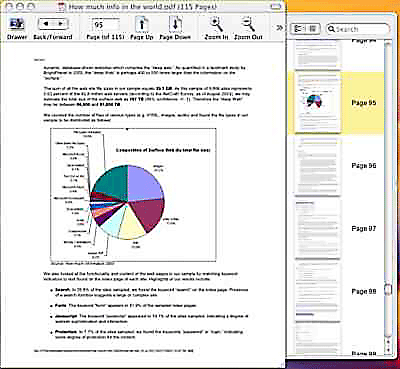
Figure 2: Preview can present thumbnails of pages on the right-hand side Drawer, allowing easy navigation for pages and images.
In previous versions of the operating system, the performance of this important application was simply terrible and users often found themselves waiting for the program to load the pages in the Drawer navigation bar. Most users picked the Adobe Reader for launching PDF documents. Worse, Preview wouldn’t let users select and copy text. All of these failings were inexplicable, since OS X’s 2D graphics engine, Quartz, is based on a foundation of PDF.
The updated Preview in Panther does now offer a compelling application for viewing PDFs, particularly for searching for text in a document. In the 115-page, text-heavy document mentioned above, a search for a word took about a second, providing a list of the word in context in the Drawer. Clicking on the item revealed the text string on the page, and highlighted. Very slick.
I found the Font Book application to be a fine basic type tool, managing the fonts in the many places they can hide in Mac OS X and Classic folders (see Figure 3). While it will be good enough for most consumers, content creation professionals with real font management issues will likely want to purchase a more robust tool from third-party software vendors.
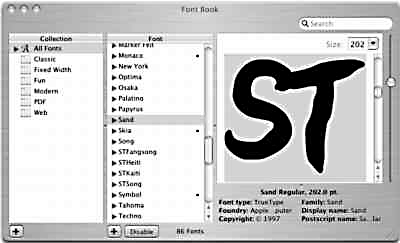
Figure 3: Font Book isn’t really a book, but it does display font attributes in a variety of ways and lets you manage your fonts.
Playing Well With Others
Apple has touted Panther’s expanded support for networking and improved performance with Windows servers. The update offers beefier handling of Windows’ SMB (Simple Message Block) resources, support for virtual private networking (VPN), and some limited connections to Microsoft’s important Exchange platform. Apple offers a Web page on the subject, which includes a useful PDF briefing and an overview of the tweaks.
As a person who now uses a Mac inside a Windows shop, I really wanted it all to work and work well. However, many of the new features are lacking.
For example, OS X’s Mail application can now check Exchange servers for e-mail messages and there’s a checkbox in the Address Book to sync up contacts with Exchange. I had trouble with both, and the Mail application missed a message or two. This is a very serious problem to a person who minds his e-mailbox by the second. I am using Microsoft’s patch for the OS X version of Entourage, which also has its problems, but losing e-mail isn’t one of them.
On the other hand, Panther’s support for Java and JavaScript is much better than the past, especially for Macs still on the Classic OS, so its Safari browser can handle more pages and online resources.
I also appreciated Panther’s new Network Preferences panel, which now provides a bunch of useful information (see Figure 4). This information was not so well organized or readily available in the past.
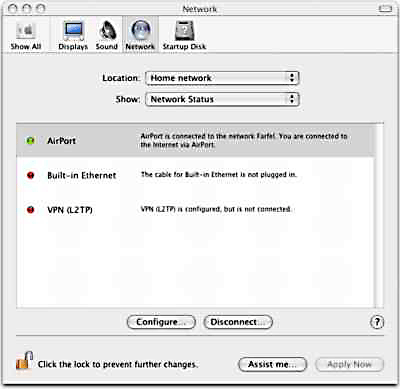
Figure 4: Here’s a readout of the Panther Network Preferences panel on my computer. It shows the status of live networking, in this case an active Wi-Fi connection to the router named Farfel, as well as two possible but currently inactive connections: the Ethernet port and the Internet Connect virtual private network, which it considers as a separate entity.
For content creators in a Mac-centric shop, these Windows additions are a non-issue for the most part. However, many Mac users work with Windows at some time or other, or even daily. Panther’s extra compatibility may improve the workflow, although likely to no great degree.
Switching Time?
So again, the question returns: Is Mac OS X Panther worthy enough to get content creators off of the Classic Mac OS? Maybe. Maybe not.
One reader, Stephen Scharf, offered some reasons that may hold him back. He’s a self-described semi-professional digital sports photographer. He said he’s still using an old first-generation Power Mac G3 desktop, which isn’t supported by Mac OS X, let alone Panther.
"I know that I need to upgrade CPU’s soon, and I can’t get the Photoshop throughput I need with the old G3, but one reason I have hung on to OS 9.2 is very simple: I can still print with it," Scharf said.
He pointed to concerns about his Epson 2200 Ultrachrome printer. "The Epson drivers, while leaving a lot to be desired, work pretty well with the Epson 2200 under OS 9.2. With OS X 10.2, there are major limitations to what the Epson driver can do."
These problems are compounded in Panther, and I have first-hand experience with this, Scharf said. "I recently attended a color management workshop in Santa Fe. The instructor was running Photoshop CS and a late beta [release] of Panther. He just could not get the Epson 2200 to work reliably (sometimes not at all) with Panther."
"Apple still has a long way to go IMHO to get me to think about switching [to OS X]," he said, adding that he would likely purchase a PowerMac G4, which can boot into both OS 9.2 and OS X Panther.
Still, I appreciate the stability of Mac OS X. I recently had a Web-based application crash my browser a few times. Under Panther, I clicked a button and relaunched the browser seconds later, with my other applications — and more importantly, my open documents — untouched by the experience. Each of those crashes would have chewed up perhaps 5 minutes of rebooting, launching and checking on Mac OS 9.2.
If you’re already running Mac OS X Jaguar, then you should upgrade to Panther for sure. Those of you running the Classic Mac OS, should take a close look-see, especially at the combination of the Power Mac G5 and this updated operating system.
As observed by the medieval sage Bahya Ibn Paquda: "Nothing accomplishes nothing." With the Panther OS update and PowerPC G5 hardware, you could discover a new level of productivity. That is, if you can first get your printer to work.
Read more by David Morgenstern
This article was last modified on January 18, 2023
This article was first published on November 20, 2003
Commenting is easier and faster when you're logged in!

Recommended for you
Industry Analysis: Even If You’re Not in the Obituary Pages, You Could Still Be Dead
Have you ever heard an older person say, “I read the obits every day and i...

The Path to Beautiful Tables: Working With Table Rules
In this installment of our series on creating beautiful tables (see Part 1 here)...

The Adobe Illustrator Summit agenda is here!
We’re thrilled to share the full agenda for The Adobe Illustrator Summit, t...