



Creative professionals have a natural interest in the speed of storage for scratch disks and also in storage capacity for their large files. With the changes in the storage market over the past five years, I bet most readers can imagine a workday without SCSI. Sure, no problem. I bet many of you don’t even remember SCSI. But what about FireWire?
I considered this thought last week as the clutter in my office reached critical proportions. The stacks of outdated software, piles of techno-tchotchkes, and tangles of cables had become hazardous to my health. It wasn’t safe to walk, in bare feet or even in boots. So a bit of housekeeping was in order.
Sent to the dump were scads of dinosaur-era SCSI cables and devices. Like most content creation professions, I’m a bit nostalgic about these cables and drives, since I’ve used SCSI peripherals some 17 years more or less. Now they’re just junk taking up valuable real estate in the extended closet I call an office.
However, following a recent demonstration of a forthcoming storage technology at a Silicon Valley conference, my discarded SCSI products could have some company in the next year or two.
Remembrance of Storage Transitions Past
Some of these SCSI items are now almost curiosities. For example, the original 50-pin SCSI-1 cables were held in place by little wire loops on the drive that fit into small openings on the connector; these were replaced in later versions of the specification since they acted as little antennas and interfered with the electrical performance of the cable (see Figure 1).
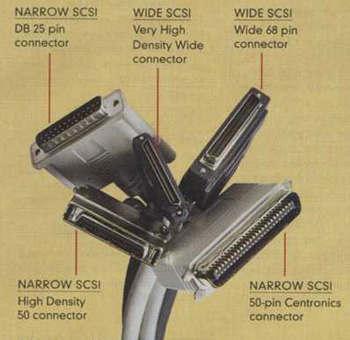
Figure 1: Be careful — it bites! Here’s a bunch of old SCSI connectors Hydra-style, some narrow and some wide. The big one in the front was the Centronics 50-pin physical interface for SCSI (the 25-pin flavor used on the Mac Plus and later models is the top left-hand connector). You can see the little horns on the sides of the 50-pin connector that allowed little metal "ears" to click into place and hold it down. This mechanism was later replaced by internal, plastic clips that didn’t create electromagnetic interference.
I also discarded various adapters and gender changers; old 25-pin Mac-only cables and plugs; termination dongles; and of course, various drives using now-ancient interfaces with capacities measured in tens of megabytes (see Figure 2). I found (and tossed in the pile, despite my sentimental attachment) an old custom cable I had made around 1987 with lots of extra shielding. And there were lots of cables of varying lengths.
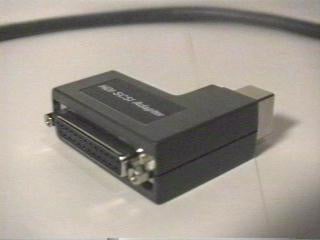
Figure 2: Even Apple notebooks had SCSI ports but with a special connector. This dongle converted the PowerBook’s port to the 25-pin Apple SCSI standard. It also enabled the notebook to operate as a hard disk when connected to a host.
All of these items have some value, of course, and many sites still sell them, which I was astounded to discover, although they seem to cost less now than in the days. Regardless, my workflow now has no use for them.
It Rhymes with "Fuzzy"
Certainly, content creators on the Mac have always been aware of SCSI, since it became standard equipment with the Mac Plus in 1986. And PC owners also took advantage of SCSI’s early performance lead with host adapter cards.
The current top flavor of SCSI is called Ultra320 SCSI, and has a maximum theoretical speed of 320MB per second. However, these drives are mostly attached to servers instead of graphics workstations. In addition, this may be the end of the line for the standard as the industry is moving to a new serialized version of the standard, called Serial-Attached SCSI (SAS).
However, the place of SCSI on the Mac platform grew much more complex when Apple traded the SCSI port for FireWire with the introduction of the Blue-and-White Power Macintosh G3 model in 1999.
FireWire offered many benefits: hot plug and play, longer cable lengths, and no termination problems. However despite the calls from Apple’s pitch-men and -women that FireWire was the perfect replacement for SCSI, FireWire initially suffered in the comparison — it was slower. And this slowed its adoption by performance-conscious content creators.
Over time, with the introduction of faster FireWire drives, these growing pains were overcome and many content-creation pros transitioned their storage from external SCSI storage to FireWire. Today we have devices with FireWire 800 and FireWire 400 interfaces as I described in a previous column.
Take the machines in my office (please) as an example. I now have only one machine running SCSI. It’s a tower machine with a SCSI PCI host adapter card that I use for my scanner as well as for a couple of old storage drives, such as a Zip drive and an ancient CD-R burner.
But I have no real need for the SCSI storage, since these formats are covered by drives in another computer or connected via USB. I really only need SCSI nowadays to maintain my old scanner. When that goes, so may the SCSI storage.
Like most of you, my external hard disk storage is a stack of second-generation FireWire drives, which offer good-enough performance for my needs (and current budget). Some of the drives provide network backup for the other machines and others as temporary storage for large files. To improve their performance, I’m looking at running them in an array, but that must be grist of some future column.
A Complete Breakfast Includes Serial
A while ago I attended the Intel Developer Forum conference in San Jose, Calif., and saw some interesting storage devices based on the Serial ATA II interface. This interface could supplant that stack of FireWire storage on my desk.
If you’ve purchased a computer over the past half a year, you may or may not have seen some flavor of Serial ATA on your logic board. It’s now found in most high-end PC systems depending on their market positioning and in Apple’s new PowerPC G5 models.
The serialized standard is the successor to the venerable ATA, which is parallel; they are usually called SATA and PATA, respectively. For the most part, PATA has stayed inside machines near the logic board. While it’s reasonably fast, offering theoretical speeds of over 100MB per second, it was never designed as an external interface as was SCSI or FireWire. It only supported two drives on its bus, one a master and the other a slave.
On the other hand, SATA provides many of the features we’ve come to expect from "modern" storage. The interface supports hot plugging without the need to shut down the system, and there’s no need to set jumpers on the drive or worry about termination.
In addition, its cables are much easier to install and work with; SATA supports a long thin cable instead of PATA’s short 40-pin flat ribbon cable that was often difficult to maneuver inside a chassis. These new thin cables also help improve the airflow inside computer enclosures, a good thing since a system packed with several fast processors and lots of memory can run hot.
Of course, speed is very important and SATA offers a maximum theoretical data transfer rate of 150MB per second, about a third faster than FireWire’s top speed. In addition, like FireWire, SATA is more intelligent than its parallel predecessor and doesn’t require as much attention from the main processor when sending that data, letting the processor spend more time on crunching your image.
Many storage vendors have introduced SATA PCI host adapter cards for Windows PCs. Addonics Technologies Inc. offers a combo card with SATA, FireWire 400 and USB 2.0 interfaces.
Some developers have announced Mac-centric SATA cards supporting both Classic and Mac OS X (although users updating to the Panther version of the OS may need an updated driver). For example, FirmTek LLC offers its SeriTek/1S2 Host Adapter card directly and through distribution; and Sonnet Technologies Inc. last week announced a $99.95 card due by the end of the year.
In addition, WiebeTech LLC recently released a SATA version of its DriveDock converter family, which lets Windows users connect a common ATA drive to a SATA port. The dock and power adapter kit costs $139.95. The company also offers a bundle with a host adapter for $169.95.
Is there a Serial ATA drive in your future?
These products above are all based on the first version of the SATA specification, which is plain ol’ SATA. And based on the current crop of hard drives on the market and performance reviews, SATA doesn’t spell a big problem for FireWire storage.
For example, Bare Feats’ Editor Rob Morgan this summer compared the performance of a single drive and a striped pair of drives with FireWire 800, parallel ATA/133, and SATA interfaces. While the SATA won most of the performance tests, the FireWire setup was very close.
As I’ve mentioned in previous articles, there is no such thing as a native FireWire drive. Instead, an external FireWire drive actually combines a standard ATA drive with small logic board holding a "bridge" converter chip and the FireWire interface. There is some overhead in this protocol conversion process that a drive with a native SATA interface is able to avoid, giving it a relative performance edge.
Morgan’s tests suggested that a striped array of two SATA drives will offer good performance even on older machines with slower PCI buses.
However, the forthcoming SATA II devices I saw at aforementioned Intel conference will start to enter the market some time in the next year and will offer a more robust set of features that can boost performance and usability.
For content creators, the next-generation additions to note will fall into two camps: optimized performance for the drive itself and support for external connections.
High-performance hard disks often support a variety of routines that jiggle the order of items being read or written by the drive. Instead of taking these instructions (called commands) one at a time in the order that they’re received, the drive reorders them in a more efficient manner; it takes the next block that’s coming down the line, which could be the last on the list.
But most entry-level drives today don’t have as much of this reordering technology onboard. With SATA II, more drives will get this secret sauce, called native command queuing, which can improve performance by as much as 100 percent, depending on the data.
At the same time, there’s support for an external connector. The current SATA cable is designed only to be used inside an enclosure and the cables aren’t shielded for electromagnetic interference. The current cards provide internal and external connectors, which are fine for servers and other similar applications.
In addition the current plug isn’t very robust. It’s not meant to be plugged and unplugged many times. In fact, that repetition will break the connector (in the industry they call that "failure"). And the plug can come undone rather easily, I was told. One storage vendor now runs a bead of hot-glue across the connectors inside their storage servers to make sure that they won’t come undone during transit!
Meanwhile, drive manufacturers recently said they will make their SATA drives smaller and require less power. Instead of 3.5-inches, the new drives will be around 2 inches, which will let desktop and server vendors pack more drives in the same enclosure. And content creators will be able to take advantage of this trend as well.
For example, I saw a demonstration of a very small array of five drives, packed into the space of a standard 5.25-inch drive bay (see Figure 3). The total capacity was a terabyte and its performance provided data transfer rates of more than 100MB per second. It played high-definition video without dropping a frame and while performing other tasks. Another similar device had four drives and its enclosure was the size of a large hard bound book. The little drives were removable.
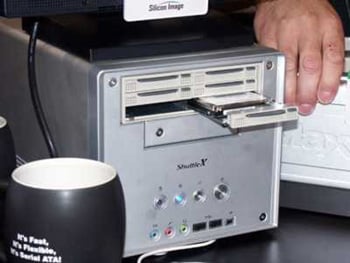
Figure 3: Here’s a photo taken of one of the SATA II demonstrations at this fall’s Intel Developers Forum by an ExtremeTech reporter. One of the drives is being removed from the array while the system keeps functioning. The hand is not that of a giant, it’s just the drives are smaller.
So, does this mean that FireWire is finished as a storage interface? Maybe not.
First, these SATA II products won’t be on the market for a while and even then they will be confined to desktop machines since no computer has even a built-in SATA I port. Contrarily, many computers have built-in FireWire ports, especially notebooks.
In addition, everything about SATA is designed as a storage interface. It won’t be used for anything other than storage. FireWire is a more flexible interface, supporting video and other peripherals as well as storage. And that support should continue for years to come.
However, for primary storage and Photoshop scratch disks, I look forward to one of these small, high-speed multidrive external arrays with the SATA II interface.
No doubt, my bank balance would be more secure if I didn’t attend these demonstrations. As the medieval sage Ibn Gabirol suggests: "The most effective defense against temptation is this: Shut your eyes." I’ve found that such a command is next to impossible when walking floor of the technology trade show.
Read more by David Morgenstern
This article was last modified on January 6, 2023
This article was first published on October 23, 2003
Commenting is easier and faster when you're logged in!

Recommended for you

InCopy Templates: Page Size and Content Area
A hard-working staffer asked for help with InCopy templates: We are a simple mas...

Automatically Transfer Photos from a Phone to a Computer with Lightroom
Follow this guide to transfer images easily and automatically from a phone to a...
Advanced PowerPoint Infographics
Go beyond SmartArt and pretty pictures in your presentation designs