



It is nearly impossible to consider the features of QuarkXPress 6.0 and not notice the massive pile of baggage crowding at the front door. The OS X question for Mac users fills a large suitcase, the InDesign vs. XPress smackdown takes up a huge trunk, and the very issue of Quark itself seems to be weighing heavily on every bag.
Here’s a brand that refuses to follow the rules and continually frustrates the industry it helped create. The legends are large and the mysteries many. Yet every few years we collectively send our offerings to Denver and go back to conducting business with a solid software product that can rightfully be called the “official global workhorse.”
That lucky position is under assault, and the next chapter of this 16-year-old story may written on the success of Quark 6.0. Whether we pony up our cash or finally say “phooey” to Quark and cede global domination to Adobe, is the key choice at stake. Based on working with the product for several weeks now, I’d say it’s premature to count Quark out. This is not a stunning upgrade, and if you’re looking for lots of bells and whistles, you’ll be disappointed. But that may very well be the key to Quark’s success — XPress 6.0 is as comfy as a pair of old shoes that just got a fresh shine and some new laces (see Figure 1).
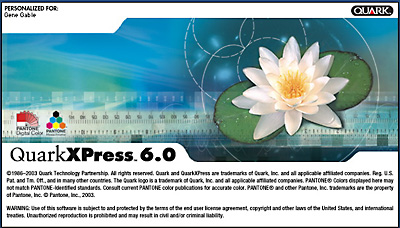
Figure 1: XPress comes to Mac OS X and Windows XP, delivering a moderate set of new features and a new price: $1,045 retail, $199-$499 for upgrades.
I’d rather leave the bulk of Quark baggage at the door, but there are a few key issues to consider outside of direct product features. Software is a relationship as much as it is a list of features, and the dialog between buyer and seller does count.
Licensing Agreements
First and perhaps most significant, is a change in how Quark enforces the licensing agreement we confirm when we install their software. Quark has always licensed use for a “single computer,” and if you’ve ever tried to run your version of XPress on more than one networked machine, you’ve gotten a warning dialog box and the program won’t open on the second machine.
But this didn’t prevent most of us from installing XPress on both our work and home computers, or on our laptop for use when we are away. The “moral” license clearly gives us the right to use software wherever we want and on whatever machine we want, assuming we don’t violate the spirit of the agreement. We understand the difference between “fair use” and “theft.”
In this version Quark has instituted a product activation system that now restricts that second “moral” license and confines single-seat buyers to only one unique machine, which is registered with Quark over the Internet or by phone (see Figure 2). There is a process whereby you can change the activation to a new or different computer, but you can’t swap back and forth between machines at will. No laptop use if XPress is activated for your desktop machine. No way to run XPress on both your work and home machines, even if you never run them concurrently. For those who travel or take their work home, this is a massive and unacceptable restriction.
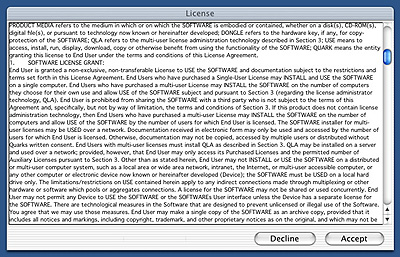
Figure 2: Be careful when you accept Quark’s licensing terms — you’re agreeing to only run the software on one specific machine (and it will only run on that machine), so no laptop and desktop use!
Adobe also specifically licenses its products for single use, but its agreement allows for laptop or home machine use, as long as they aren’t used simultaneously. A Quark spokesperson told me the company was “exploring” the question of laptop/desktop use, but if you purchase the product today, be clear that you will not be able to run your software on more than one machine until, or if, Quark revises its practice. I would counsel anyone who is considering this upgrade to complain to Quark about this policy and perhaps we can get it changed.
Quark does have a Licensing Administrator Software product, which gives larger customers a lot of flexibility in using multiple copies of XPress, but it’s overkill for single-license sites. There must be a way to please everybody, and still give Quark the aggressive protection it so desperately craves. I feel the same queasiness about these intrusive methods of control as I do when asked to check my bag before being allowed to shop at Tower Records — the presumption of guilt is unsettling.
Quark continues, by the way, to restrict use of its products geographically (the Americas version will only run on English-language operating systems). Quark has irked international users for years by selling a much more expensive multiple-language version of XPress called Passport. Adobe InDesign supports multiple languages in the same standard package and for thousands of dollars less than Passport.
The InDesign Issue
In running through the new features of XPress 6.0, I’ve tried not to make too many comparisons to InDesign, but some are unavoidable. Professional graphic designers or publishers should surely download a demo copy of InDesign and try it out before upgrading to XPress 6.0. Quark says it will have demo copies of XPress 6.0 available soon, so you don’t have to make this decision without hands-on testing. InDesign is the superior product — it integrates much better with other Adobe applications, and on a feature-for-feature basis it easily beats XPress. Adobe’s inside advantage with PDF is even clearer now that we’ve seen the PDF morsels Quark is serving up.
But software is like a musical instrument, and each program has a unique feel when you get your hands on the keyboard and start working. XPress is the Fender guitar of page-layout — we could replace it with something fancier, but the music we make on it comes out just fine. We love XPress because it continually gets out of the way and lets us do our work, and we’ve looked the other way for years when confronted with any of the negatives. Both programs are capable of turning out award-winning pages, but the industry’s heavy investment in XPress means the majority of users will make this upgrade, at least on some of their copies.
It’s sad, really, that Quark, the company, isn’t more beloved by their customers. We’d all prefer competition, and despite an almost love-fest for Adobe, no one wants single-brand domination of the industry. With a perky makeover (or perhaps major reconstruction) Quark could be a company we’d all get behind.
This article was last modified on January 18, 2023
This article was first published on July 8, 2003
Commenting is easier and faster when you're logged in!

Recommended for you

FontAgent Pro Server 2.5 Adds Leopard and Active Directory Support
Insider Software, developer of leading font-management technology for Macintosh...

Renaming links for already placed files
This tip comes from our best friend in Brussels, and InDesign “génie...

New ARTS PDF Crackerjack 5.0 makes PDF print production workflows more efficient and profitable
ARTS PDF, the leading developer of PDF tools for PDF professionals, today announ...