




When you open a new document in QuarkXPress, you have the choice of setting the page size, facing pages, page orientation, and so on. In XPress, whatever settings you make in the New Document dialog box become the default settings for the next new document. However, InDesign handles things a little differently.
In InDesign, any changes you make to the New Document dialog box (figure 1) are not stored for the next new document. Instead, with no document open, choose File > Document Setup (figure 2). The settings you make in Document Setup become the default for all new documents. Then, close that dialog box, and choose Layout > Margins and Columns to set the other page defaults (figure 3).

Figure 1
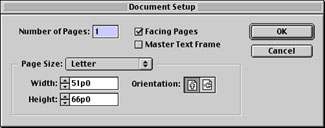
Figure 2

Figure 3
I agree — it’s more work than you’d face in XPress, but there is an advantage: Even if you make bizarre changes to a document in the New Document dialog box, you’ll never lose your regular new document preferences.
Read more On the Move to InDesign tips here.
Read more by Sandee Cohen.
This article was last modified on March 10, 2025
This article was first published on March 6, 2002
Commenting is easier and faster when you're logged in!

Recommended for you

The Mystery of the Phantom Fill and Stroke Contest Answer and Winner
Solve this InDesign mystery for a chance at winning a great prize.

Download Dozens of Free InDesign Templates
Beginning with InDesign CS5, Adobe didn’t package templates along with the...
Design Postcards to Connect
This article is excerpted from the February/March 2010 issue of InDesign Magazin...