



This InDesign tip was sent to Tip of the Week email subscribers on April 4, 2019.

Sign up now and every week you’ll get a new tip, keyboard shortcut, and roundups of new articles, plus exclusive deals sent right to your Inbox!
Just scroll down to the bottom of this page, enter your email address, and click Go! We’ll take care of the rest. Now, on with the tip!
Did you know that Word’s DOCX file format is a glorified ZIP file? Change the extension to ZIP, unzip it, and you’ll find all of the document’s original assets, including the images as individual files in a folder.
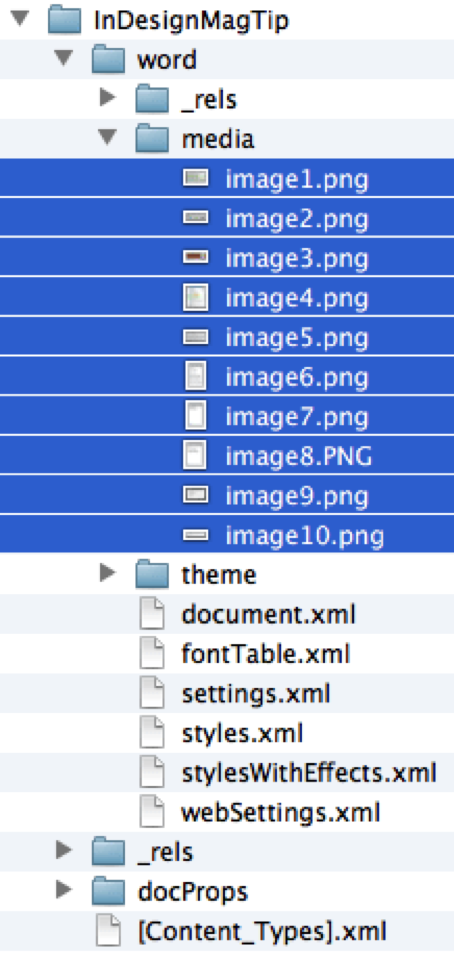
More importantly,InDesign can access the original high-resolution images when you place a DOCX file, even if they’re CMYK. The older DOC format converts all images to RGB PNG files.
This article was last modified on July 7, 2021
This article was first published on April 9, 2019
Commenting is easier and faster when you're logged in!

Recommended for you

Designing a Restaurant Menu
How to use InDesign to create a menu for a restaurant or cafe that’s attractive,...

InQuestion: Viewing Spot Colors and Blend Modes With Overprint Preview
This article appeared in Issue 112 of InDesign Magazine. Claudia McCue shows why...

5 Tips for Better Tables
Use these 5 quick tips to improve the appearance and usability of your InDesign...