


InReview: MasterPlan
Keith Gilbert reviews a solution that offers publishers large and small a way to securely share digital page previews—or entire publications—for online viewing.


This article appears in Issue 120 of InDesign Magazine.
Book and periodical publishers today face a huge challenge when it comes to publishing their content digitally: there isn’t a single output method or distribution platform that meets all of their needs. PDFs are too easy to copy and distribute illegally. Publish Online isn’t searchable and can’t be monetized. Fixed-layout EPUB lacks robust support across operating systems and devices. What is a publisher to do?
MasterPlan is an attempt to solve this problem. It is a way for publishers large and small to securely share digital page previews—or entire publications—for online viewing. MasterPlan “live streams” publications to any modern browser and to any website you permit to use your content.
The Basics
When you sign up for MasterPlan, a bookshelf is created for your account, and a cover image for each document you publish appears on this bookshelf (Figure 1).
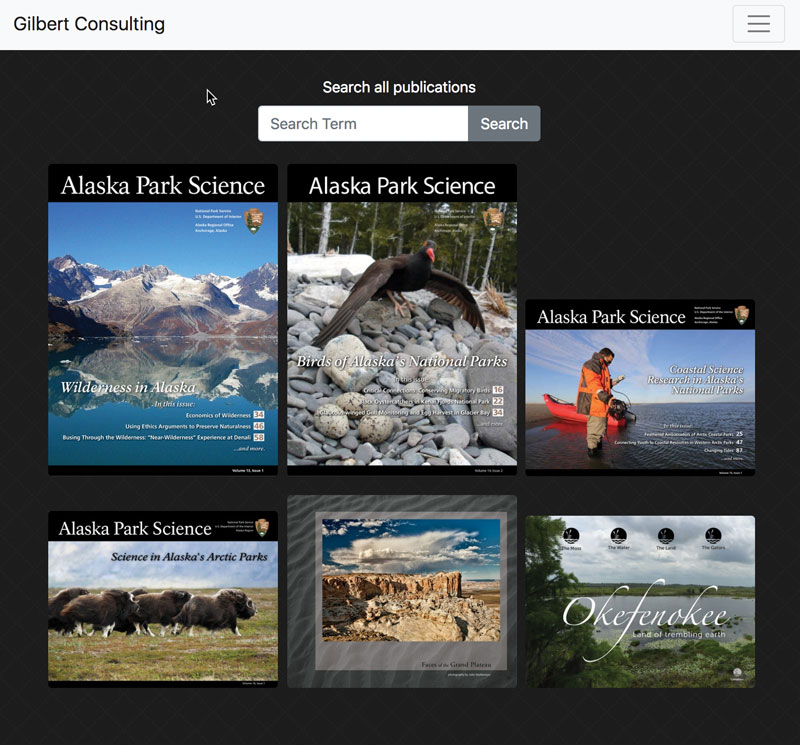
Figure 1. A typical bookshelf created by MasterPlan
Once you’ve uploaded one or more documents to your bookshelf, you can then share the URL to this bookshelf (or to individual documents, or even individual pages of documents) or embed it directly into a website. When a reader clicks on a cover image on the bookshelf, they see a thumbnail displayed for each page or spread of the document (Figure 2).
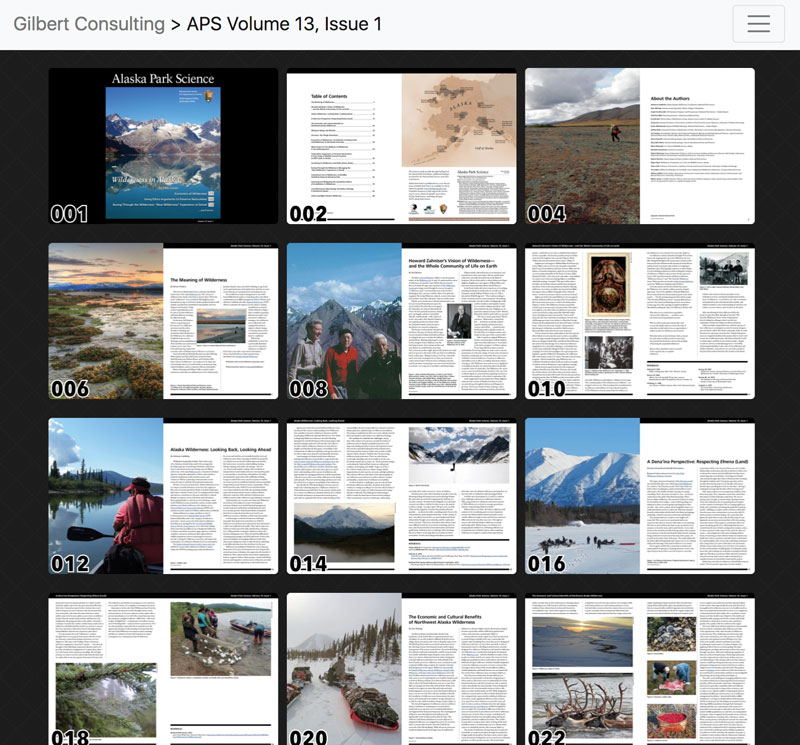
Figure 2. The MasterPlan display of every spread of a single publication
Then, clicking a spread displays a “flip book” style reader, similar to the Publish Online viewer that works well in both desktop and mobile browsers. You can access a sample bookshelf and view some sample documents here.
Who It’s For
I see two distinct types of customers for this product:
- Customers who need an alternative to InDesign’s Publish Online feature. Publish Online is great, except that the output isn’t searchable, must be hosted on Adobe’s servers, can’t be monetized, and doesn’t work with InDesign’s Book feature. MasterPlan offers a way to publish documents to the web with the simplicity of Publish Online, but without any of these limitations.
- Publishers who want to publish large quantities of content such as backlists of books or back issues of magazines, and make this content available to paid members or subscribers, or share sample pages for marketing purposes. MasterPlan makes this easy, since source documents for MasterPlan can be InDesign files, InDesign book files, PDFs, or fixed-layout EPUB files. The publisher can use robust and configurable access controls to limit who has access to which publications and for how long.
MasterPlan provides both a beautiful end-user reading experience as well as the robust and granular access controls that are usually needed by large publishers. That’s MasterPlan in a nutshell. But read on; there is a lot more to this product than meets the eye.
How It Works
To begin, a publisher signs up for a MasterPlan subscription at circularsoftware.com/subscribe/, paying $3 per publication per month. Discounts are offered for paying a year in advance and for high-volume use.
Once the publisher’s account has been set up and configured, “production” users (those tasked with uploading content to MasterPlan) download and install the MasterPlan desktop app. The app is only available for Mac, but works with versions of InDesign all the way back to CS6.
Production users use the MasterPlan desktop app to “package” and upload content to the publisher’s MasterPlan account. The process is automatic, and takes just a few clicks. The content can be an InDesign file, InDesign book file, PDF, or fixed-layout EPUB file (Figure 3).
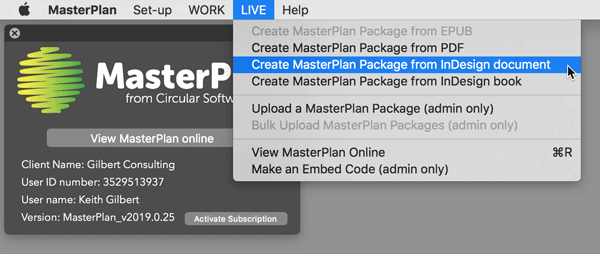
Figure 3. The MasterPlan app is used to create MasterPlan “packages” from InDesign files, InDesign Book files, PDFs, or fixed-layout EPUB files and upload them to the MasterPlan website.
If you have a large backlist of books or periodicals that you need to upload to MasterPlan, there is a command line bulk upload system available that can make this process much faster than one-file-at-a-time packaging and uploading. Or, you can hire Circular Software to take care of the packaging and uploading for you.
Admin users log in to the MasterPlan web portal to specify, on a spread-by-spread basis, whether the content is public or only available to members or subscribers, and if the content should appear in search results. Spreads can even be made public until a specific date and time, after which they will revert to only being available to members or subscribers (Figure 4).
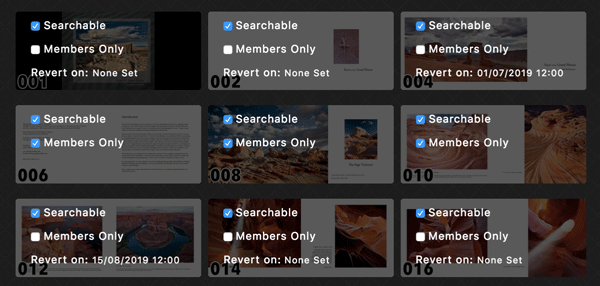
Figure 4. A portion of the Job Admin section of MasterPlan, showing controls that can be configured for individual spreads
Admin users then can distribute a URL directly to a specific page of content, a specific title, or an entire “bookshelf” of content, either to members/subscribers, or to the public for marketing purposes. Admin users can also generate a custom embed code to embed a page, a title, or the entire bookshelf on another website (Figure 5).
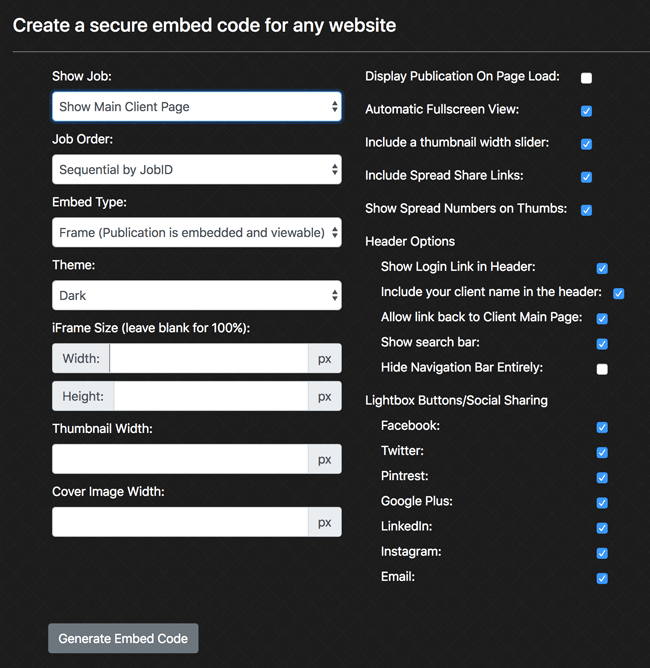
Figure 5. Admin users have lots of options for generating an embed code for a single spread, a publication, or a bookshelf.
The Reading Experience
If you’ve used Publish Online, or any other “page replica” style on-line reading system, at first glance the MasterPlan reader appears similar. But there are some really nice touches that make the in-browser reading experience work well.
The pages display accurately and with high quality in both desktop and mobile browsers. Since the whole purpose of MasterPlan is to display pixel-perfect replicas of print pages, the pages aren’t “responsive” in the sense that the page layout won’t change to accommodate the screen size. But the MasterPlan viewer does take the size of the mobile device screen into consideration, and intelligently switches between single-page view on small screens and spread view on larger screens (Figure 6).
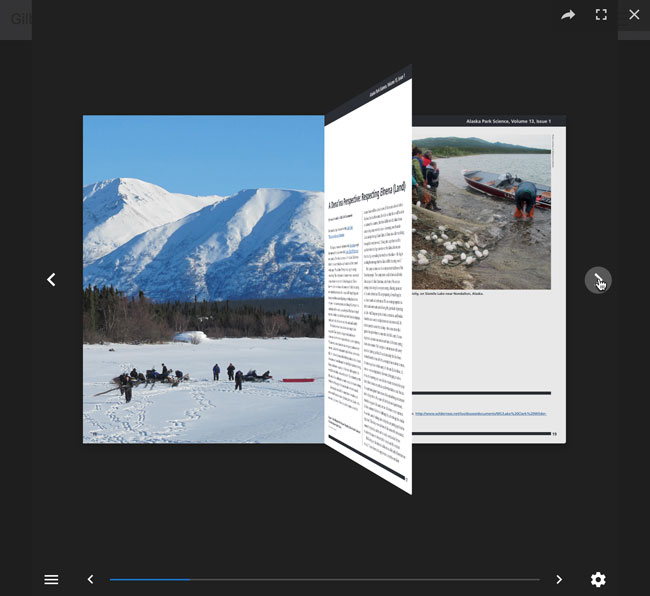
Figure 6. The MasterPlan display of a single spread, showing the “flip-book” style page-turning action. The reader can choose to view entire spreads or only single pages, and turn the page-flip action off if desired.
Since live text is retained in MasterPlan documents, all the text in the document is searchable and selectable. Depending on what you’ve allowed, users can search all the publications on a bookshelf, a single publication, a single spread, or a single page. Admin users can prevent specific spreads from appearing in search results (Figure 7).
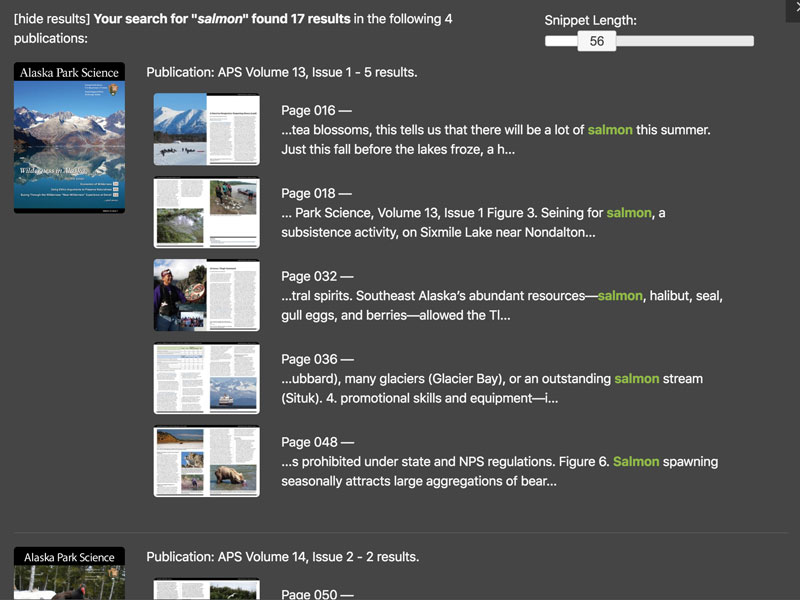
Figure 7. The result of a user searching for the word “Salmon” across all publications on a bookshelf
Any table of contents that is created with InDesign’s automatic table of contents feature, or that is included in a PDF or EPUB uploaded to MasterPlan, will display and function in the MasterPlan viewer (Figure 8).
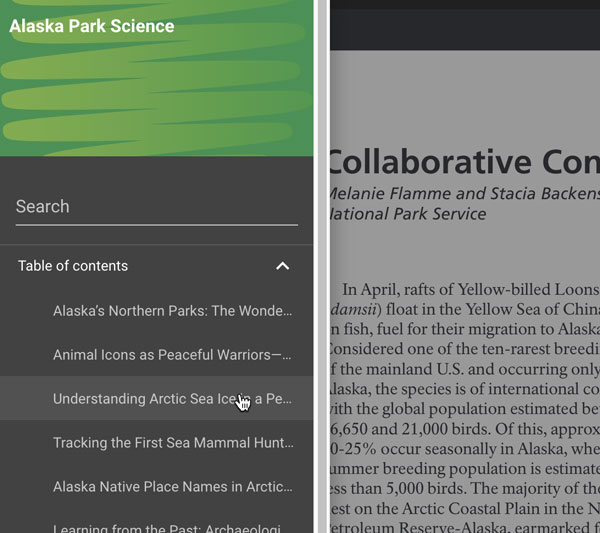
Figure 8. MasterPlan will display a clickable table of contents for any automatic table of contents that is included in an InDesign file, PDF, or fixed-layout EPUB.
You may know that InDesign supports a great deal of interactivity, such as multi-state objects, animation, and video. But the problem is that support for this interactivity and media in EPUB files is really spotty outside of Apple’s iBooks ecosystem. Fortunately, the MasterPlan viewer supports all the interactivity available for fixed-layout EPUB output, as well as the enhanced interactive, animation, and read-aloud capabilities offered by another Circular Software other product, CircularFLO. This enables you to create rich-media documents with InDesign that go far beyond the capabilities of PDF, and to ensure that they will play back correctly for any reader viewing the document in the browser through MasterPlan. See this page for an example of an interactive document created with InDesign and presented using MasterPlan.
Readers can share specific spreads to social media and bring followers to your website. These social media shares link to the actual “live” spread in the document, not just a graphic thumbnail of the spread. So when a reader shares a spread, the recipient of the share can still navigate to other spreads in the document if those spreads are public (Figure 9).
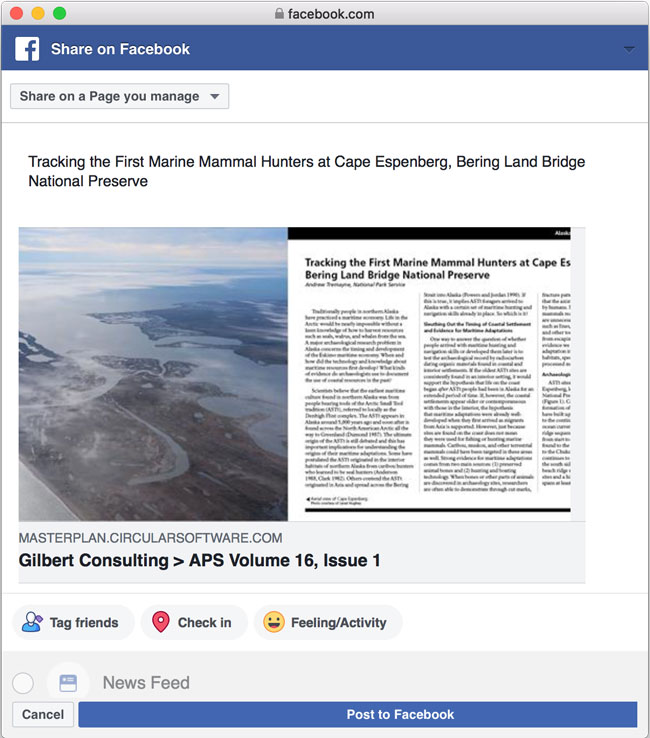
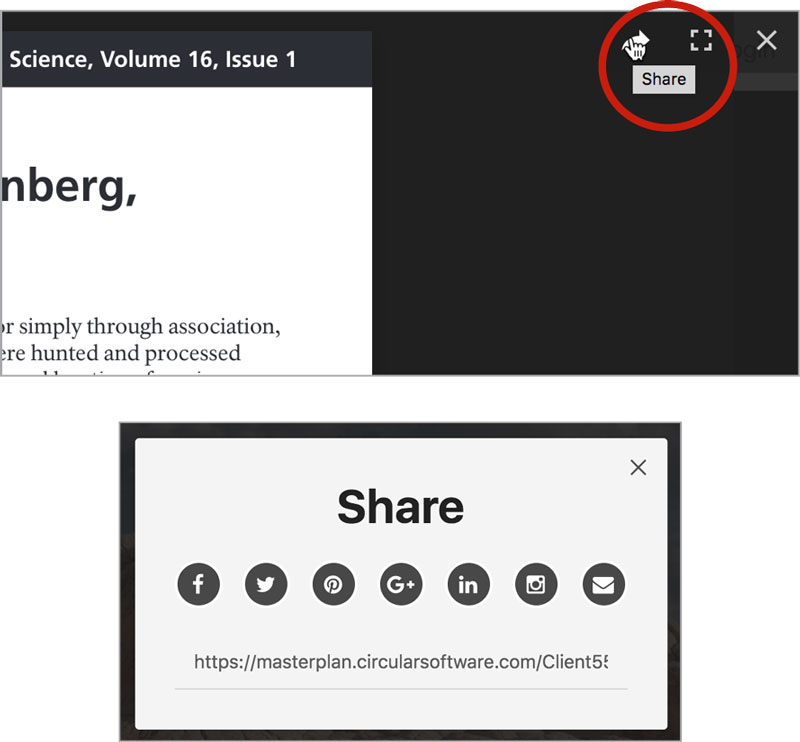
Figure 9. Readers can share links to individual spreads of a publication to social media
Access Control
MasterPlan includes a web-based admin system to create users and assign access levels to each user. So “Bob” could have access to a different set of publications or spreads than “Mary,” for example. This built-in system could suffice for a small trade association or other membership-style group with a limited number of users.
If you run a WordPress-based website with customer or subscriber logins, there is a WordPress plug-in that you can install and use to grant specific access levels to these members or subscribers. For more complex needs, Circular Software offers a full programming interface (API) to allow IT personnel to integrate MasterPlan with their proprietary internal systems and services.
Security
The premise of MasterPlan is that it allows you to share documents only with those who are authorized to view them. Document pages are streamed to the user’s browser a single spread at a time. Why is this important? The entire document is never delivered all at once in such a way that it could be saved locally and redistributed or misused. And the content is delivered faster, so the user doesn’t need to wait for a large download before reading.
Documents reside on Amazon Web Services (AWS) servers, which provide “banking grade” security. Customers can also engage with Circular Software to host the content on their own servers if they wish.
Things I’d Like to See
I really like MasterPlan. But, like anything else, there is some room for improvement. I would like to see:
- Support for reflowable EPUB as source content, in addition to the InDesign, InDesign Book, PDF, and fixed-layout EPUB sources already available. This would give publishers another way to publish reflowable EPUB content and include it alongside their content from other sources.
- Zoom-in and zoom-out tools to the viewer. The reader can pinch to zoom in on a page, which is intuitive on mobile, but not so obvious when on a desktop or laptop computer.
These small quibbles aside, MasterPlan offers an easy, low-cost, and robust way for publishers large and small to make their content available for reading online, with sophisticated access and sharing controls that allow the content to be freely available to anyone or restricted behind a login.
- Rating: 4 stars
- Cost: $3 per publication per month, less for high-volume customers. Publications with over 200 pages or over 2,000 views per month may be subject to extra charges.
- Platform: Most features are browser-based, but the MasterPlan desktop app is Mac only.
Commenting is easier and faster when you're logged in!

Recommended for you

InReview: MasterPlan WORK
Keith Gilbert reviews an impressive solution offering a birds-eye view of the st...
Poll Results: When was the last time you exported to SWF?
The results of our poll asking if you still use Flash (SWF) and a new poll on wh...
Kerntiff MoreInfo
Much of my workflow involves obscure, little understood technical features of In...